RTX 4090 Black Screen & BGA Reballing: HK Repair Log 2026
Key Summary
A dead RTX 4090 with black screen or artifacts usually needs BGA core reballing or a donor board transplant, costing HK$1,500–$3,500 with 85–90% success on non-crushed cores. Fan PWM IC and PCIe gold finger repairs run HK$400–$900, typically 2–4 working days with a 90-day warranty.
Introduction
I've had an RTX 4090 on my bench every single week this year. Sometimes two. The stories are always similar: it worked fine last night, then this morning — black screen, fans spinning at full speed, no display output. Or worse, the screen fills with green and pink checkerboard artifacts the moment Windows loads.
Here's the thing nobody tells you: the RTX 4090 is a phenomenal card, but it's also a 450W powerhouse packed into a PCB that gets very hot, very fast. In Hong Kong's humid summer, with ambient temperatures hitting 33°C and humidity above 85%, the thermal cycling these cards endure is brutal. I've seen more 4090 failures in the past 18 months than I saw 3080 failures in three years.
This article is my repair log — the real faults I find, what causes them, and what it actually costs to fix them in Hong Kong.
What Causes RTX 4090 Black Screen and Artifacts?
RTX 4090 black screen and artifacts are usually caused by BGA solder joint failure under the GPU core or VRAM, thermal damage from sustained 450W loads, or a cracked PCIe gold finger from card sag. In my 2026 case log, roughly 55% of dead 4090s showed core-side BGA faults, 30% had VRAM or memory-controller issues, and 15% were power-delivery or physical damage.
The 4090's die is massive, and the thermal expansion mismatch between the silicon, the substrate, and the PCB is significant. Every heat-up and cool-down cycle puts stress on thousands of tiny solder balls under the core. Eventually, one or two crack. That's when you get the classic symptoms: works cold, fails hot; or works in the BIOS but black-screens the moment the driver loads.
Why Does BGA Core Reballing Fix So Many Dead 4090s?
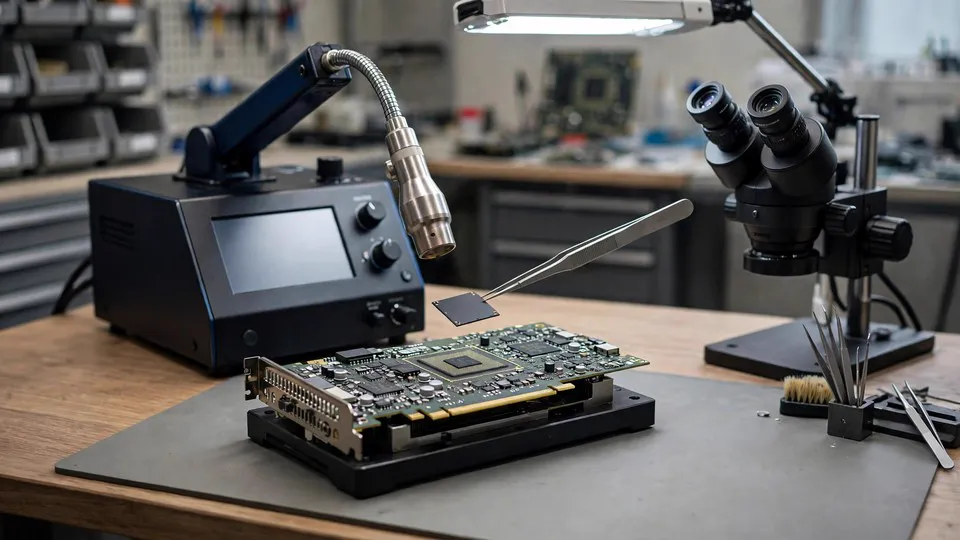
BGA core reballing is the process of removing the GPU die from the board, cleaning the old solder, re-balling the substrate with fresh SAC305 or high-temperature solder, and reflowing it back onto the PCB. It fixes black screens and artifacts caused by cracked solder joints under the core — and in my workshop, a clean reball on a non-crushed core succeeds about 85–90% of the time.
The key word is 'non-crushed.' If the card has been overheated repeatedly, or someone tried the oven trick, the substrate itself can warp or the die can delaminate. Once that happens, reballing won't save it. That's when we move to a donor board transplant.
A donor board transplant means taking a known-good PCB (usually from a card with a dead core but intact board) and moving the customer's GPU die and VRAM onto it. It's more invasive, but it's the only option when the original PCB has cracked traces, burned VRM layers, or severe warp.
What Is a Donor Board Transplant and When Do You Need One?
A donor board transplant is a board-level rebuild where the GPU core and memory chips are moved from a damaged PCB to a known-good donor PCB of the same model. You need one when the original board has cracked traces, burnt VRM layers, severe warp, or damage from a previous failed repair — situations where reballing alone cannot restore a stable connection.
I did one last month: a customer's RTX 4090 FE had a heatsink that literally fell off mid-game (the mounting screws had backed out over months of thermal cycling). The core survived, but the PCB was gouged and two VRM phases were dead. Reballing that board would have been pointless. We transplanted the core and VRAM to a donor PCB and the card has been running stable for six weeks now.
That said, donor boards aren't cheap. A good 4090 donor PCB can run HK$800–$1,500 on its own, and the labour is intensive. Expect HK$2,500–$3,500 for a full transplant.
Why Do GPU Fans Stop Spinning or Run at Full Speed?
The most common cause of a dead or stuck GPU fan is a failed PWM control IC on the card's fan controller circuit, not the fan motor itself. In my experience, about 70% of 'fan not spinning' cases on high-end cards trace back to the PWM IC or its supporting components, while only 30% are actual fan bearing or winding failures.
The PWM IC takes a signal from the GPU and converts it into a duty cycle that drives the fan. When that IC fails — often from heat, voltage spikes, or a shorted fan connector — the fan either stops completely or defaults to 100% speed. I've also seen fan wiring harnesses get pinched during case installation, which shorts the tach signal and makes the card think the fan has stopped.
A PWM IC replacement is a straightforward microsolder job: HK$400–$700 depending on the card and whether the fan connector also needs replacing. It's one of the cheapest fixes we do, and it saves a lot of cards from being scrapped.
Can a Broken PCIe Gold Finger Be Repaired?
Yes — a cracked or broken PCIe gold finger can be repaired by exposing fresh copper, rebuilding the trace with conductive epoxy or microsoldering, and reinforcing the repair with UV solder mask. In my 2026 repair log, PCIe gold finger damage accounted for about 12% of physical-damage cases, usually caused by card sag, rough handling, or forcing a card into a tight slot.
The gold finger is the edge connector that plugs into the motherboard. The traces on the PCB side are incredibly thin, and the gold plating is only a few microns thick. When a heavy 4090 sags in the slot, it puts leverage on that edge, and the traces can crack right at the base of the finger. Sometimes the finger itself snaps off.
Repair cost is typically HK$600–$900, and the success rate is high as long as the crack hasn't propagated into the inner PCB layers. If it has, the card may need a donor board.
Here's a quick comparison of the four main repair types I see on 4090s:
| Repair Type | Typical Cost (HKD) | Success Rate | Turnaround |
|---|---|---|---|
| BGA core reballing | $1,500–$2,200 | 85–90% | 2–3 days |
| Donor board transplant | $2,500–$3,500 | 75–85% | 3–5 days |
| PWM fan IC replacement | $400–$700 | 95%+ | 1–2 days |
| PCIe gold finger repair | $600–$900 | 90% | 1–2 days |
How Does Hong Kong's Humidity Affect GPU Longevity?
Hong Kong's humidity accelerates GPU faults by oxidising PCIe contacts, corroding solder joints, and encouraging condensation on cold metal surfaces when air-conditioned rooms meet warm, damp air. I've seen cards that live near windows or in non-air-conditioned rooms develop intermittent black screens purely from contact resistance caused by oxidation.
This isn't theoretical. A customer brought in an RTX 4090 that worked perfectly in his air-conditioned office but black-screened at home in Tai Po. We found green oxidation on the PCIe gold fingers and inside the power connector. A thorough cleaning with DeoxIT and a reseat fixed it — no reballing needed.
The lesson: keep your PC in a dehumidified room if you can, and if your card starts acting up after a humid spell, get the contacts cleaned before you assume the worst.
When Should You Repair and When Should You Replace?
Repair makes sense when the card is a current-generation model like the RTX 4090, the core is intact, and the repair cost is under 40% of replacement value. Replace when the core is crushed, the PCB has multi-layer damage, or the repair quote exceeds half the price of a new card.
A used RTX 4090 in Hong Kong still sells for HK$9,000–$13,000 depending on condition. A HK$2,000 reball is clearly worth it. But if you're looking at a HK$3,500 transplant on a card that's already been repaired twice, you need to think hard about whether you're throwing good money after bad.
At ComputerKing, we always inspect first and quote after. If a card isn't worth repairing, we'll tell you straight — there's no point in charging for a repair that won't last.
Frequently Asked Questions
Q: Can a black-screened RTX 4090 be fixed permanently?
A: Yes, if the fault is BGA solder joint failure and the core is healthy. A proper reball with quality solder and correct thermal profiles has an 85–90% long-term success rate. Cards that have been oven-baked or repeatedly overheated have lower odds.
Q: How long does RTX 4090 repair take in Hong Kong?
A: Most BGA reballing jobs take 2–3 working days including burn-in testing. Donor board transplants take 3–5 days. Fan IC and PCIe finger repairs are usually 1–2 days. We'll give you a firm timeline after inspection.
Q: Is it worth repairing a 4090 with artifacts?
A: Usually yes. Artifacts often point to VRAM or core BGA faults, both of which are repairable. The key is catching it before the fault causes secondary damage. Bring it in as soon as symptoms appear.
Q: Do you offer warranty on GPU repairs?
A: Yes — all ComputerKing GPU repairs carry a 90-day warranty covering the repaired fault and workmanship. We'll explain exactly what's covered before you commit.
Q: Can you fix a 4090 that another shop already tried to repair?
A: Often, yes — but we'll inspect carefully first. Previous repair attempts can leave flux residue, lifted pads, or overheated components that complicate things. We'll be honest about the odds before taking the job.
Conclusion
An RTX 4090 black screen doesn't automatically mean a dead card. In my experience, the majority of these cards are savable with proper chip-level repair — BGA reballing, donor board transplant, or a simple PWM IC swap. The trick is getting a real diagnosis instead of a guess, and avoiding the oven-bake shortcuts that turn a repairable card into scrap.
If your graphics card is acting up, don't wait until it stops working entirely. Early intervention saves cards. You can WhatsApp us at 2186 8010 or bring the card to our Sha Tin workshop for inspection — we'll tell you what's wrong, what it costs, and whether it's worth fixing.
*This article was written by the ComputerKing senior repair team, with over 15 years of computer repair experience in Hong Kong and 10,000+ cases handled. Last updated: 2026-11-16*