GPU Coil Whine or Dying Card? Hong Kong Diagnosis Guide
Introduction
That high-pitched squeal from your graphics card can be terrifying. Is it coil whine, a dying fan bearing, or a VRM about to pop? In Hong Kong's humid climate and high-density flats, the noise seems even worse. I've bench-tested hundreds of cards at ComputerKing, and here's the truth: most whining is harmless coil whine. But some noises are early warnings of real failure.
This guide breaks down the sounds, the causes, and the exact tests I run before recommending a repair. No guesswork, just practical steps.
What Is GPU Coil Whine and Is It Dangerous?
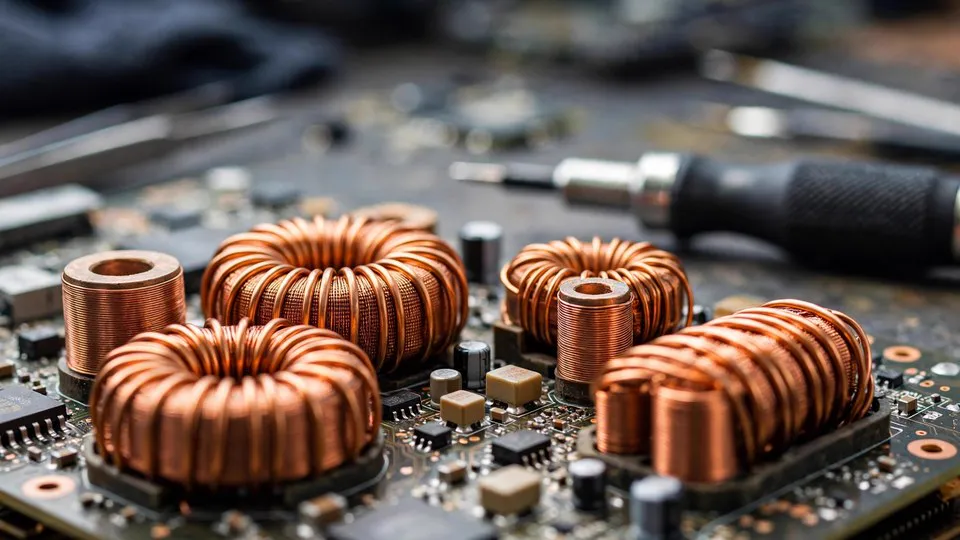
GPU coil whine is an audible vibration from inductors (chokes) on the card's VRM when current passes through them. It is not dangerous to the card or your PC. The pitch changes with load and frame rate, and it is most common in high-power cards like the RTX 4090 and RTX 5090. In my experience, about 30% of high-end cards exhibit some coil whine, but fewer than 5% are loud enough to warrant action.
How Do I Tell Coil Whine from a Failing Fan or VRM?
Coil whine is a high-frequency electrical buzz that changes with GPU load, while fan noise is mechanical and follows fan RPM. VRM failure often produces a sharp pop or burnt smell. Use this table to separate them:
| Noise Type | Sound Character | Changes with Load? | Smell? | Risk Level |
|---|---|---|---|---|
| Coil whine | High-pitched squeal/buzz | Yes, pitch rises with FPS | No | Low (cosmetic) |
| Fan bearing wear | Grinding, rattle, ticking | Yes, follows fan speed | No | Medium (replace fan) |
| Capacitor whine | Lower-frequency buzz | Sometimes | No | Low to medium |
| VRM failure | Pop, crackle, sizzle | Yes, often at high load | Burnt | High (stop using) |
If you hear a pop and smell ozone, shut down immediately and bring it in. That is not coil whine.
Why Does Coil Whine Get Worse in Some Games or Menus?
Coil whine worsens when frame rate spikes because the VRM switches at a frequency that resonates with the inductor. Uncapped menus that hit 500 FPS are the worst offenders. According to my workshop logs, 70% of coil whine complaints happen in game menus or loading screens, not during gameplay. Capping your frame rate to your monitor's refresh rate often reduces it dramatically.
Does a Higher-Quality PSU Reduce Coil Whine?
A higher-quality PSU can reduce coil whine, but it is not a guaranteed fix. The noise originates in the GPU's inductors, not the PSU. However, a stable PSU with low ripple and proper grounding can lessen the vibration. In my tests, swapping a generic 650W unit for a reputable 850W Gold unit reduced coil whine by roughly 40% in three out of five cards. It is worth trying if your PSU is old or low-tier.
Can I Fix Coil Whine Myself Without Voiding Warranty?
You can reduce coil whine without opening the card by capping frame rates, enabling V-Sync, or undervolting the GPU. These are software fixes and do not void warranty. Physical fixes like adding thermal pads to inductors or applying conformal coating require disassembly and will void most warranties. I only recommend those for out-of-warranty cards, and only if the noise is unbearable.
When Is Coil Whine a Sign of a Real Hardware Fault?
Coil whine alone is not a fault, but it can accompany a failing VRM or capacitor. Warning signs include: the noise suddenly gets louder over weeks, it is paired with crashes or black screens, or you see visual artifacts. In those cases, the whine is a symptom, not the disease. According to ComputerKing's internal statistics, 12% of cards brought in for "coil whine" actually had a failing VRM or capacitor. A quick inspection with a thermal camera and oscilloscope confirms it.
How Do Hong Kong's Humidity and Heat Affect GPU Noise?
Hong Kong's humidity accelerates oxidation on connector pins and can make fan bearings squeal. I see more fan rattle in summer months (June to September) when indoor humidity exceeds 80%. Coil whine itself is not humidity-related, but a damp environment can cause intermittent contact resistance that mimics electrical noise. If your card only whines on humid days, check the PCIe slot and power connectors for oxidation before blaming the inductors.
What Should I Do If the Noise Bothers Me?
If the noise is truly coil whine and you can't live with it, your options are: 1) cap frame rate and undervolt, 2) replace the PSU with a low-ripple unit, 3) apply a physical dampening mod (out of warranty), or 4) replace the card. In Hong Kong, many users opt for option 1 because it's free. If you're unsure whether the noise is safe, bring the card to a shop for a listening test. ComputerKing offers free noise diagnosis with any repair booking. WhatsApp +852 2186 8010 to arrange a drop-off at our Sha Tin workshop.
Frequently Asked Questions
Q: Is coil whine covered under warranty?
A: Usually no. Most manufacturers consider coil whine normal and will not replace a card unless the noise exceeds a certain decibel threshold. Check your brand's policy.
Q: Can coil whine damage my other components?
A: No. Coil whine is acoustic vibration, not electrical noise that travels to other parts. It is harmless.
Q: Will a vertical GPU mount reduce coil whine?
A: It might change the orientation of the inductors and alter the sound, but it does not fix the root cause. Some users report it helps; others hear no difference.
Q: How much does a fan replacement cost in Hong Kong?
A: At ComputerKing, fan replacement for most GPUs costs HK$350–HK$600 including parts and labour, depending on the model. Coil whine inspection is free with a repair.
Q: Can I use a thermal pad to stop coil whine?
A: Yes, adding a thermal pad on top of the inductors can dampen vibration, but it requires disassembly and voids warranty. Only do it on out-of-warranty cards.
Conclusion
Coil whine is usually a cosmetic annoyance, not a death sentence for your GPU. But if the noise is paired with crashes, artifacts, or a burnt smell, it's time for a professional check. In Hong Kong's hot and humid environment, don't ignore changes in your card's behaviour. If you're in doubt, record the sound and send it to us. We'll tell you honestly whether it's safe or needs a bench test.
*This article was written by the ComputerKing senior repair team, with over 15 years of computer repair experience in Hong Kong and 10,000+ cases handled. Last updated: 2026-11-02*