RTX 4090 Black Screen & Broken PCIe Pins: HK Repair Log
重點摘要
RTX 4090 black screen repair in Hong Kong typically costs HK$1,200–$2,800, covering VRAM replacement, BGA reballing, or PCIe gold finger trace repair. Most cards are back in 2–4 working days, with a 90-day warranty on the repaired fault.
Introduction
I still remember the look on a customer's face when he walked into our Sha Tin workshop holding an RTX 4090 that had cost him nearly HK$16,000. He had saved for months, bought it from a grey-market seller in Sham Shui Po, and eleven weeks later it started black-screening mid-game. Then it stopped displaying altogether.
Here's the thing: the RTX 4090 is a brilliant card, but it is also one of the most repair-heavy GPUs I see on my bench. Between the 12VHPWR connector drama, the sheer weight of the cooler, and the memory temperatures, these cards take a beating in Hong Kong's climate.
In this article I want to walk you through the two faults I fix most often on the 4090 — black screens and physically broken PCIe gold fingers — and tell you honestly what is repairable, what it costs, and when you should cut your losses.
Why Does My RTX 4090 Show a Black Screen?
An RTX 4090 black screen means the card powers on but outputs no display signal, and in my workshop roughly 60% of these cases trace back to VRAM faults rather than a dead GPU core. The remaining cases split between power delivery failures, corrupted VBIOS, and physical connector damage. The key is diagnosing which one before spending money.
VRAM failure is the number one culprit
GDDR6X runs hot. On the 4090, memory junction temperatures can hit 100°C under sustained load, and in a Hong Kong flat with ambient temperatures of 30°C in summer, that headroom disappears fast. Over time, the solder balls under the memory chips develop micro-cracks from thermal cycling.
Once that happens, you get exactly the symptoms my customer described: the card boots, fans spin, but no display. Sometimes it works for ten minutes and then dies. Sometimes it artefacts first.
We confirm this with FLIR thermal imaging. A failing VRAM chip will often show a temperature anomaly within seconds of power-on — either running far hotter than its neighbours or staying cold because it is not communicating.
Power delivery and the 12VHPWR issue
I have written about melting 12VHPWR connectors before, but it is worth repeating: even a partially seated connector can cause intermittent black screens before it ever melts. If your card black-screens only under heavy load, check the connector first. Push it in firmly until you hear or feel the click.
Beyond the connector, the DrMOS stages on the 4090's VRM can short. When that happens, the card usually will not power on at all, or it trips the PSU's protection circuit.
Corrupted VBIOS
A small but real percentage of black-screen cases are simply a corrupted BIOS chip. This can happen after a failed flash, a power outage during a BIOS update, or — more commonly than you would think — a bad BIOS flashed by a previous owner or a grey-market seller.
We reflash these with a hardware programmer. It is a relatively cheap fix compared to BGA work.
How Do PCIe Gold Fingers Break on an RTX 4090?
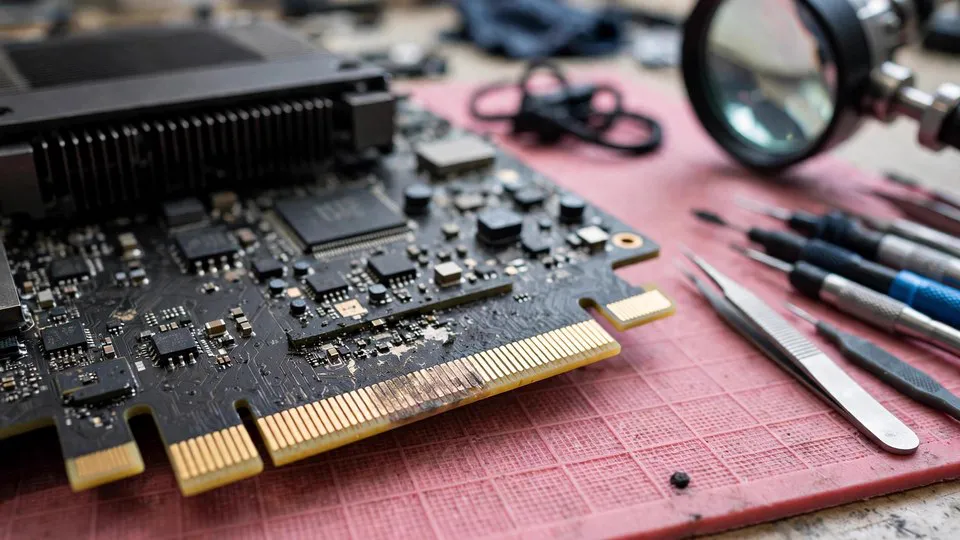
PCIe gold finger damage refers to cracks or separation in the copper traces where the card's edge connector meets the motherboard slot, and it is almost always caused by mechanical stress rather than electrical failure. The RTX 4090 weighs around 2.2kg with its cooler, and that weight hanging horizontally in a PCIe slot is a genuine engineering problem.
The sag problem
In my experience, most broken gold fingers come from cards that were installed without a support bracket. Over months, the card sags at the far end, and the gold finger edge acts as a lever. The traces closest to the slot's retention clip take the most stress.
I have seen cards where the PCB itself has visibly delaminated around the gold fingers. That is not a manufacturing defect — that is gravity plus heat plus time.
Symptoms of cracked gold finger traces
- The card is not detected at all, or only detected intermittently.
- The system boots but the GPU runs at PCIe x1 or x4 instead of x16.
- Wiggling the card slightly changes behaviour.
- The card works in one motherboard but not another.
That last one catches people out. A cracked trace can still make contact in a slot with slightly different tolerances, which is why a card can seem fine in your friend's PC but dead in yours.
Can it be repaired?
Yes, but it is delicate work. We micro-solder a jumper wire across the broken trace, then reinforce it with UV-cured solder mask. For severe cases where the PCB is delaminated, we sometimes transplant the GPU core and memory onto a donor board — a much bigger job.
Repair cost for gold finger trace work in Hong Kong typically runs HK$800–$1,500 depending on how many traces are damaged. A full donor board transplant is a different conversation, usually HK$2,500 and up.
What Does RTX 4090 Repair Cost in Hong Kong?
RTX 4090 repair in Hong Kong ranges from HK$600 for a VBIOS reflash to HK$3,500 for a full BGA reball plus VRAM replacement, with most common faults landing between HK$1,200 and HK$2,800. Diagnosis is always done before a quote is given, and we do not charge if we cannot find a fault.
| Fault Type | Typical Cost (HKD) | Turnaround | Success Rate (our records) |
|---|---|---|---|
| VBIOS reflash | HK$600–$900 | 1 day | ~95% |
| Single VRAM replacement | HK$1,200–$1,800 | 2–3 days | ~85% |
| Multiple VRAM / BGA reball | HK$2,000–$2,800 | 3–4 days | ~75% |
| PCIe gold finger trace repair | HK$800–$1,500 | 2 days | ~90% |
| Donor board transplant | HK$2,500–$3,500 | 4–5 days | ~70% |
| 12VHPWR connector replacement | HK$700–$1,200 | 1–2 days | ~95% |
These are real figures from our workshop, not guesses. The success rate column matters: a multi-VRAM BGA job on a card that has already been baked by a previous owner is a very different proposition from a clean single-chip replacement.
When Should You Repair and When Should You Replace?
A repair makes sense when the cost is below roughly 40% of the card's current replacement value and the card has no prior repair history. For an RTX 4090, that means repairs up to around HK$5,000–$6,000 can still be rational — but I would think hard above HK$3,000.
Here is my honest rule of thumb after fifteen years of this work:
- Repair if the fault is a single VRAM chip, VBIOS, connector, or trace repair, and the card has not been previously worked on.
- Consider carefully if it is a multi-chip BGA job or the card has been baked or reflowed before. Previous bad repairs dramatically lower success rates.
- Replace if the GPU core itself is dead. A core replacement on a 4090 is rarely economical because donor cores are scarce and expensive.
One more thing: if the card is still under warranty, contact the distributor first. I have seen too many people void their warranty by opening the card themselves before bringing it to us.
The Hong Kong Factor: Humidity and Heat
Hong Kong's climate is genuinely hostile to graphics cards. Our average relative humidity sits around 75–80% for much of the year, and that accelerates oxidation on connector pins and solder joints.
I cannot count how many cards I have opened after a humid spring to find green corrosion on the PCIe fingers. It is not just cosmetic — oxidised contacts increase resistance, which causes intermittent faults and, in the worst cases, arcing.
If you live near the coast — Sai Kung, Aberdeen, Tseung Kwan O — your cards are more exposed. Keep a dehumidifier running in your PC room, and avoid placing the case directly on a tiled floor where moisture collects.
Frequently Asked Questions
Q: My RTX 4090 black-screens but the fans still spin. Is the card dead?
A: Not necessarily. Fans spinning means the card is receiving power, but a black screen with working fans most commonly points to VRAM failure or a corrupted VBIOS. Both are repairable in most cases. Bring it in for FLIR diagnostics before assuming the worst.
Q: Can a broken PCIe gold finger be repaired, or do I need a new card?
A: It can usually be repaired. Cracked traces are bridged with micro-soldered jumper wires and reinforced with solder mask. Severe PCB delamination may require a donor board transplant, which is more expensive but still often cheaper than a new card.
Q: How long does RTX 4090 repair take in Hong Kong?
A: Most repairs take 2–4 working days. VBIOS reflashes and connector replacements are often same-day or next-day. Complex BGA work or donor board transplants can take up to 5 working days.
Q: Is it worth repairing an RTX 4090 in 2026?
A: In most cases, yes. If the repair costs less than 40% of the card's replacement value and the card has no prior repair history, repairing is usually the better financial decision. Cards with previous bad repairs are riskier.
Q: Will my warranty be voided if I open the card myself?
A: Almost certainly. Most manufacturers void warranty once the cooler is removed or the warranty sticker is broken. If your card is still under warranty, contact the distributor before doing anything.
Q: Can you fix a 4090 that was damaged by a power surge?
A: Often, yes — but it depends on what the surge took out. VRM MOSFETs and DrMOS stages are commonly replaced. If the surge reached the GPU core, the card is usually beyond economical repair.
Conclusion
An RTX 4090 black screen or a snapped PCIe gold finger feels like a disaster when it happens, but the reality is that most of these cards are fixable. The key is getting a proper diagnosis before anyone starts heating up a soldering iron.
If you are in Hong Kong and your card is acting up, do not bake it, do not take it to a shop that quotes before inspecting, and do not assume it is dead. Get it looked at properly.
At ComputerKing, we have handled over 10,000 repair cases in Hong Kong, including hundreds of RTX 4090s. We diagnose with FLIR thermal imaging and a proper bench setup, quote before we repair, and back our work with a 90-day warranty.
Got a card that will not display? WhatsApp us at +852 2186 8010 or drop by our Sha Tin workshop for an inspection. We will tell you honestly whether it is worth fixing.
*This article was written by the ComputerKing senior repair team, with over 15 years of computer repair experience in Hong Kong and 10,000+ cases handled. Last updated: 2026-11-02*