GPU Overheating but Fans Spinning? HK Repair Guide 2026
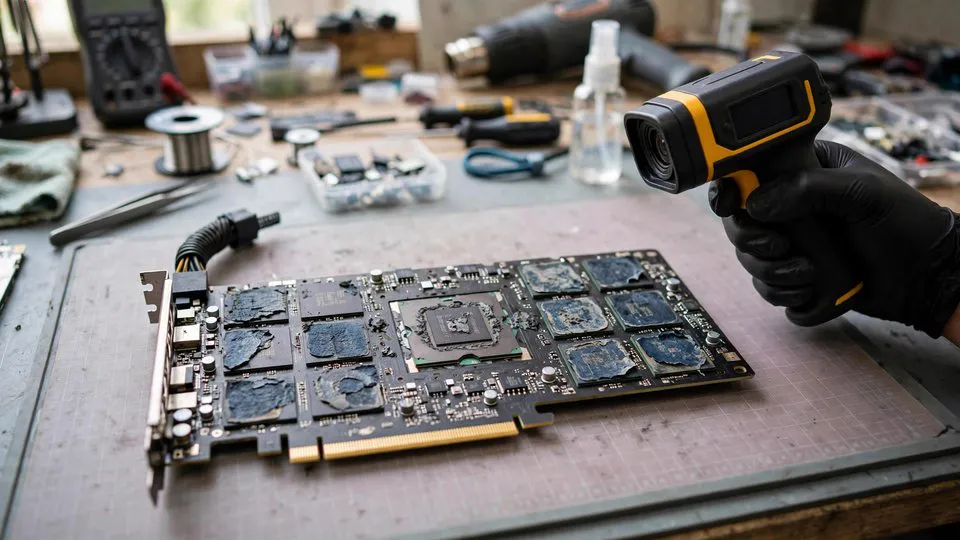
Introduction
Your GPU fans are spinning, the case has airflow, yet the card still throttles or shuts down under load. In my workshop in Shek Mun, this is one of the most common complaints I hear — and it's rarely a simple "dusty fans" problem. After years repairing graphics cards in Hong Kong's humidity, I can tell you that most overheating cases that reach my bench have nothing to do with the fans at all.
重點摘要
GPU overheating with working fans is usually caused by degraded thermal pads, dried thermal paste, or poor VRM contact — not fan failure. Repair cost in Hong Kong is typically HK$600–$780 including pad replacement and stress testing, completed in 2–3 working days with a 90-day warranty.
Why Does My GPU Overheat When the Fans Are Still Spinning?
GPU overheating with functional fans is typically caused by heat not reaching the heatsink efficiently — degraded thermal pads, dried thermal paste, or lost mounting pressure — rather than insufficient airflow. In my experience, most cards that come in with "overheating despite working fans" have thermal interface material (TIM) that has hardened, pumped out, or crumbled away entirely.
Here's the thing: fans only move heat that has already travelled from the GPU die and VRAM into the heatsink. If the thermal path is broken, the fans can spin at 100% and still fail to cool anything. I've seen RTX 3080s with fans screaming at 3,000 RPM while the core sat at 87°C — because the paste had turned into chalk.
What Are the Most Common Hidden Overheating Causes I Find?
The most common hidden overheating causes are: (1) thermal pad degradation on VRAM and VRM, (2) thermal paste pump-out on the GPU die, (3) bent or uneven cooler mounting, and (4) VRM MOSFET degradation causing increased resistance and heat. These four account for most of the "fans spinning but still hot" cases we handle.
Let me break down each one:
- Thermal pad degradation: Stock pads on many RTX 30 and 40 series cards degrade within 2–3 years, especially in Hong Kong's humid climate. They turn brittle, oil out, and lose contact with the VRAM chips.
- Thermal paste pump-out: As the GPU heats and cools, paste gets squeezed outward from the die. After 18–24 months, the centre of the die may have almost no paste left.
- Mounting pressure loss: Screws loosen slightly over time, or the cooler frame warps. Even 0.1mm of lift drastically increases thermal resistance.
- VRM degradation: MOSFETs that have run hot for years develop higher on-resistance, generating more heat and creating a feedback loop.
How Do I Tell Whether It's Thermal Pads, Paste, or Something Else?
You can distinguish thermal pad failure from paste failure by monitoring the gap between GPU core temperature and memory junction temperature. If the core is 75°C but memory junction hits 105°C, the VRAM pads are almost certainly gone. If both core and hotspot are high (e.g., 80°C core, 105°C hotspot), the die paste is the likely culprit.
Use HWiNFO64 and watch three sensors: GPU Core, GPU Hotspot, and GPU Memory Junction. A healthy card typically shows a core-to-hotspot delta of 10–15°C and memory junction within 20°C of core under load. Once the delta exceeds 25°C, something in the thermal path has failed.
| Symptom Pattern | Likely Cause | Typical Fix |
|---|---|---|
| Core 75°C, hotspot 105°C | Die paste pump-out | Repaste with high-viscosity paste |
| Core 75°C, memory 108°C | VRAM thermal pad failure | Replace pads with correct thickness |
| Core and hotspot both 95°C+ | Mounting pressure loss | Reseat cooler, check screws and frame |
| VRM temp high, core normal | MOSFET degradation | VRM inspection and possible replacement |
| All temps high, fans at 100% | Airflow or heatsink blockage | Clean fins, check case airflow |
Why Does Hong Kong Weather Make GPU Overheating Worse?
Hong Kong's average relative humidity of 75–85% accelerates thermal pad degradation and promotes oxidation on contact surfaces. In my workshop, cards from coastal districts like Sai Kung and Aberdeen show noticeably faster pad deterioration than cards kept in air-conditioned offices in Central.
Humidity does two things. First, it speeds up the chemical breakdown of silicone-based thermal pads, causing them to oil out and harden. Second, it encourages oxidation on copper cold plates and aluminium heatsink bases, which adds a microscopic insulating layer. Combined with ambient temperatures that regularly hit 33–35°C in summer, a card that runs fine in winter can suddenly throttle in July.
If your flat isn't air-conditioned during the day, your GPU is effectively being heat-cycled harder than a card in a server room. That's why I often recommend a repaste and pad replacement every 2 years for Hong Kong users, rather than the 3–4 years often quoted in Western guides.
Can I Just Crank Up the Fan Curve and Ignore It?
No — running fans at 100% to compensate for degraded thermal interface material is a temporary patch that accelerates fan bearing wear and does not fix the underlying heat-transfer problem. In my experience, this buys you a few weeks at best before throttling returns, and it often masks rising VRAM temperatures that can permanently damage memory chips.
I've had customers who ran their fans at maximum for months, then came in with a card that had both degraded pads and two worn-out fans. The repair bill went from a HK$600 pad job to HK$1,200 because they also needed fan replacement.
What Does a Proper Overheating Repair Involve?
A proper overheating repair involves full disassembly, cleaning of all thermal surfaces, replacement of thermal pads with correctly-sized alternatives, fresh paste application, and a stress test to verify temperatures. This typically takes 2–3 working days and costs HK$600–$780 depending on the card and how many pads need replacing.
The process I follow:
- Baseline logging — record core, hotspot, and memory junction temperatures under a 20-minute stress test.
- Teardown and inspection — check pad condition, paste coverage, and screw torque.
- Surface cleaning — remove old paste and pad residue with isopropyl alcohol and lint-free swabs.
- Pad selection — measure gap thickness with a feeler gauge and select pads of the correct compressed thickness.
- Reassembly and torque — tighten screws in a cross pattern to even pressure.
- Verification — rerun the stress test and compare deltas.
If the VRM shows signs of MOSFET degradation or the card has other faults, I'll quote separately before proceeding. You can WhatsApp us at 6558 6806 to arrange a drop-off or ask about your specific model.
When Is Overheating a Sign of a Bigger Fault?
Overheating can signal a deeper fault when temperatures rise suddenly without dust buildup, when the card shuts down at idle, or when thermal fixes don't improve readings. These patterns point to VRM failure, a failing temperature sensor, or early-stage BGA solder fatigue rather than a simple cooling problem.
I recently had an RTX 3090 that came in with "overheating" — the customer had already repasted it twice. Thermal imaging showed one VRM phase running 40°C hotter than the others. That was a failing MOSFET, not a cooling issue. A pad and paste job would have done nothing.
Frequently Asked Questions
Q: How often should I replace GPU thermal pads in Hong Kong?
A: Every 2 years is a reasonable interval for Hong Kong's humidity, or sooner if memory junction temperatures exceed 100°C under load.
Q: Can I use any thermal pad thickness?
A: No. Pads that are too thin leave gaps, and too-thick pads prevent the cooler from seating. Always match the original compressed thickness or measure the gap.
Q: Will repasting void my warranty?
A: On most brands, yes. If your card is still under warranty, check with the distributor before opening it — or let a repair shop handle it with proper documentation.
Q: My GPU is only 1 year old and already hot. Is that normal?
A: Not normal, but not rare. Some factory paste applications are poor. If temperatures are high from day one, log them and consider an early repaste.
Q: Can overheating damage my GPU permanently?
A: Sustained memory junction temperatures above 110°C can degrade VRAM over time. Modern GPUs throttle to protect themselves, but throttling itself indicates the cooling is inadequate.
Conclusion
Overheating with spinning fans is almost never a fan problem — it's a heat-transfer problem. In Hong Kong's climate, thermal pads and paste degrade faster than most users expect, and ignoring the early warning signs only makes the eventual repair more expensive.
If your card is throttling, running hot at idle, or showing a large core-to-memory temperature gap, get it looked at before the damage spreads to the VRAM or VRM. We handle thermal repairs, FLIR diagnostics, and full board-level fixes — drop by our Shek Mun workshop or WhatsApp 6558 6806 to book an inspection.