GPU Cooler Not Sitting Flat? Mounting Pressure, Core Hotspots & Paste/Pad Contact Diagnosis Guide
Key Takeaways
When a graphics card's cooler is not sitting flat, heat cannot leave the chip evenly, so the core temperature climbs quickly under load while the fans still spin normally, and the gap between the core temperature and the hottest point on the chip widens. This guide explains how uneven mounting pressure creates that pattern, and how to tell it apart from dried thermal paste, the wrong thermal pad thickness, blocked airflow, and fan failure, using observation only, without opening the card.
The Pattern Worth Naming Before Any Testing
This guide is about one narrow pattern, and it needs to be stated exactly before anything else is considered, because a loose description will send the diagnosis in the wrong direction. The card behaves acceptably at idle or under light use. Under sustained load, such as a game, a render, or any long period of heavy graphics work, the core temperature climbs fast, much faster than the user expects from the fan noise they can hear. The fans are spinning, and they may even be spinning hard, yet the temperature keeps climbing, or settles at a level that forces the card to slow itself down to protect the chip. When the load stops, the temperature falls back again. That combination, fast climb under load, fans apparently working, and recovery at idle, is the starting point.
Within that pattern, one further observation is often reported, and it is the observation that gives this guide its focus. Monitoring software that reports both a core temperature and a hotspot temperature shows the two readings drifting apart under load. At idle they sit relatively close together. Under load, the hotspot reading pulls away from the core reading, and the gap between them grows. The gap itself is not a fault code, and it does not name a single cause on its own. It is a clue about uneven heat transfer: some part of the chip package is getting much hotter than the average the core reading represents, which is exactly what happens when the cooler is not making even contact across the surface it is supposed to cool.
Naming the pattern first matters because several different faults can produce a hot card, and they call for different responses. A card choked with dust, a card with a dead fan, and a card whose cooler is sitting unevenly can all run hot under load. Treating them as the same problem leads to the wrong fix, such as cleaning a card that is not dusty, or replacing a fan that was never the problem, while the uneven contact remains untouched. The rest of this guide therefore works by elimination: it explains the mounting-pressure mechanism in enough detail to recognise it, and then sets out the observations that separate it from each of its look-alikes, one at a time.
A word of caution belongs at the very start, and it governs everything that follows. Everything in this guide is observation from outside the card: what the fans sound like, how temperatures behave over time, how the card was installed, and whether anything about its mounting has changed. Nothing here asks the reader to take the cooler off, to loosen or tighten screws, or to replace paste or pads. Those are internal steps, and they carry real risks, including damage to the chip or the board, loss of warranty, and a worse contact problem than the one that was there before. Where this guide reaches a point at which internal inspection would be needed, it says so plainly, and it says to hand the card to a professional instead. Observation is not a lesser form of diagnosis. In this case, it is the form that keeps a suspicious card from becoming a damaged card.
How a Cooler Is Supposed to Sit
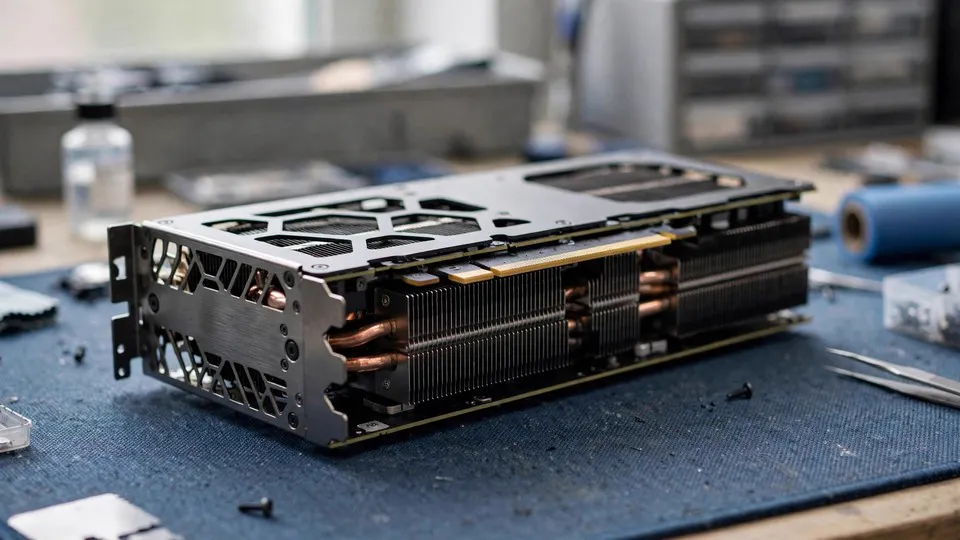
To understand uneven contact, it helps to picture what even contact is supposed to look like. A graphics card cooler is a large assembly: a metal base or vapour chamber plate that sits against the graphics chip, heat pipes or a fin stack that carry heat away from that plate, and fans that push air through the fins. The assembly is held against the board by a set of mounting screws, usually arranged around the chip, often with springs that are meant to apply steady, even pressure. Between the metal plate and the chip sits a thin layer of thermal paste, whose job is to fill the microscopic gaps between two surfaces that are never perfectly smooth at a microscopic scale. Around the chip, on the memory chips and power delivery components, sit thermal pads, which bridge larger gaps to the same cooler or to a separate plate.
The key idea is that the whole system depends on contact, and contact depends on pressure being even. Heat can only cross from the chip into the cooler where the two surfaces actually meet, directly or through a thin, continuous layer of paste. Where contact is good, heat flows readily. Where contact is poor, because a gap has opened up, heat is trapped on the chip side. The paste layer is meant to be thin and uniform. It is not a filler for a large gap, and it cannot compensate for a cooler that is tilted or held away from the chip on one side. If the cooler sits flat, the paste layer stays thin everywhere, and heat leaves the whole chip surface at a similar rate. If the cooler tilts, even slightly, the paste layer becomes thin on one side and thick on the other, or, in the worst case, the cooler loses contact with part of the chip surface altogether.
Mounting pressure is what keeps the cooler flat. The screws and springs are designed to press the cooler down evenly, so that no corner lifts and no edge bears all the load. When that pressure is even, the cooler cannot rock, and the paste layer stays as intended. When the pressure is uneven, because one screw is looser than the others, because a screw is not seated squarely, because a spring has weakened or is missing, or because something is trapped between the cooler and the board, the cooler can sit at a slight angle. The angle does not have to be visible to the naked eye to matter. A tilt too small to see can still open a gap large enough to disrupt heat transfer across part of the chip, and that disruption is what the temperature readings then show.
It is also worth understanding why the effect appears under load and not at idle. At idle, the chip produces relatively little heat, so even a cooler making partial contact can carry that heat away well enough to keep temperatures unremarkable. The bottleneck only reveals itself when the chip is producing heat at full rate. Then the area of poor contact becomes a local trap: heat is generated across the whole chip, but it can only escape efficiently through the area that is still in good contact. The poorly contacted area gets hotter than its neighbours, and the hottest point on the chip, the hotspot reading, rises faster than the average core reading. That is the mechanism behind the widening gap, described in plain terms: not a mysterious sensor fault, but uneven escape routes for heat.
Why the Fans Can Sound Normal While the Card Overheats
One of the most confusing features of this pattern is that the fans can sound entirely normal, or even loud, while the card still overheats. That confusion is understandable, because fan noise is the most obvious sign of cooling effort, and it is natural to assume that a card with working fans must be cooling properly. The assumption is wrong, and understanding why it is wrong is central to this guide.
Fans cool the fin stack, not the chip directly. Their job is to push air through the fins so that heat already carried into the fins can be released into the air. If the heat never reaches the fins efficiently, because contact between the chip and the cooler base is poor, then the fins stay cooler than they should be, and no amount of fan speed can fix the problem at its source. The fans can be doing their job perfectly, moving air exactly as designed, while the chip still overheats, because the bottleneck is upstream of the fans, at the contact surface. Loud fans in this situation are not evidence that cooling is working. They are evidence that the card is trying hard to cool itself, and that the effort is not reaching the place where the heat is trapped.
This is also why fan behaviour alone cannot distinguish the causes of a hot card. A card with blocked airflow will also spin its fans hard, because the control system raises fan speed in response to rising temperature, regardless of the cause. A card with a dead fan will sound quiet on one side. A card with uneven contact will typically sound normal or loud, because all its fans are present and responding. The diagnostic value of fan observation is therefore limited to one thing: it can rule fan failure in or out, and it can show that the cooling system is trying. It cannot confirm that contact is good, and it must not be used as reassurance that contact is good.
There is a related observation that is more useful than fan noise, and that is the temperature of the air leaving the card. It is a qualitative observation, not a measurement, and it should be treated as such. In a card cooling normally, sustained load produces a clear stream of warm air from the exhaust area, because heat is being carried from the chip, through the cooler, and out into the air. In a card with poor contact, the exhaust air may feel less warm than the reported chip temperature would suggest, because less heat is reaching the fins to be carried out. This observation is suggestive, not decisive, and it is affected by case airflow and ambient conditions, so it should never be used on its own. But as one observation among several, it fits the mechanism: heat trapped at the chip does not warm the exhaust as much as heat properly transferred would.
The Core-to-Hotspot Gap: What It Means and What It Does Not
Monitoring software on many cards reports more than one temperature. The core reading, often called the GPU temperature, represents an average or a principal sensor reading across the chip. The hotspot reading represents the hottest point measured on the chip package. At idle, or under light load, the two readings are usually relatively close, because the chip is producing little heat and the cooler is carrying it away evenly enough that no part of the chip stands far apart from the rest. Under heavy load, some separation is normal, because the chip does not heat perfectly uniformly even with good contact. The diagnostic question is therefore not whether any gap exists, but how the gap behaves.
In the uneven-contact pattern, the gap widens noticeably as load is sustained, and it widens in step with the fast climb of the core temperature itself. The card gets hot quickly, and at the same time the hottest point pulls further away from the average. That paired behaviour, fast climb plus widening gap, is the signature worth noticing. It points toward uneven heat transfer, because a uniformly poor cooler, such as one choked with dust, tends to raise all temperatures together, while a locally poor contact raises one area disproportionately. The distinction is one of proportion, not of a single threshold, and no single number in this guide is presented as a pass or fail line, because the normal size of the gap varies with the card design, the chip, and the cooling solution. What matters is the change under load, and the pairing of that change with the other observations in this guide.
It is equally important to say what the gap does not prove. A widening gap does not prove that mounting pressure is the cause. It proves only that heat transfer is uneven, and uneven transfer can also arise from other causes, including paste that has dried out unevenly, or a pad problem that changes how the cooler sits. That is why this guide does not stop at the gap. The gap earns the mounting-pressure hypothesis a place on the list. The elimination work that follows is what earns it the status of a likely explanation, or removes it in favour of another cause.
Sensor readings also deserve a general caution. A temperature reading is only as useful as the conditions under which it was taken. Readings taken during a brief spike of load, readings taken with the case side panel off versus on, and readings taken in a hot room versus a cool room are not directly comparable. For the observations in this guide to mean anything, they should be compared under similar conditions: the same kind of sustained load, the same case arrangement, and enough time under load for temperatures to settle into their sustained behaviour, rather than a snapshot taken seconds after load begins. A single screenshot of two numbers, without that context, is not a diagnosis.
Causes of Uneven Mounting Pressure
Uneven mounting pressure does not happen by itself, and understanding its common causes helps the reader judge whether the hypothesis fits their card's history. The causes below are mechanical, and they are described so that the reader can recognise a relevant history, not so that the reader can attempt a fix.
The first cause is a mounting screw that is not applying the same pressure as the others. Screws can work loose over time, particularly on a card that has been transported, removed and refitted, or subjected to vibration. A screw that has backed off even slightly reduces pressure on its corner of the cooler, and the cooler can then tilt toward the opposite side, or lift on the loose corner. Springs fitted to the screws are meant to keep pressure steady, but a spring that has weakened, or that is missing after a previous service, changes the balance in the same way. The result in both cases is the same: the cooler is held more firmly on one side than the other.
The second cause is a cooler that was never seated squarely in the first place, or that was disturbed after fitting. A card that has been removed for cleaning, for a case move, or for installation in a different machine, and then refitted, may not have been reseated exactly as before. A screw tightened out of sequence, or tightened unevenly, can leave the cooler tilted from the start. Physical knocks to the machine, or a heavy cooler sagging under its own weight over time, can also shift the assembly, particularly on large, heavy coolers that exert considerable leverage on their mount. Card sag, where the far end of a long card droops, is a related but distinct issue: sag stresses the board and the slot, and it can also change how the cooler sits relative to the board, though sag alone does not prove a contact problem.
The third cause is something trapped or misplaced between the cooler and the board, or a change in the pads that support the cooler. Thermal pads do more than cool memory and power components: their thickness and position also help determine how the cooler sits. If a pad is displaced, doubled up, or replaced with one of the wrong thickness during a previous service, the cooler may rest on the pads on one side while sitting higher on the other, or it may be held away from the chip by a pad that is too thick. This is the point at which the mounting-pressure story and the pad-thickness story overlap, and they often cannot be separated from outside the card. That overlap is not a failure of the guide. It is a reason to hand the card to a professional when internal inspection is needed, because the professional can see which of the two is actually happening.
The fourth cause is damage or wear in the mounting hardware itself: a stripped screw thread, a cracked mounting bracket, or a backplate that no longer distributes pressure evenly. These are less common, but they belong on the list because they produce exactly the same symptom, and because they are the kind of fault that cannot be corrected by simply tightening something. In fact, attempting to tighten a damaged mount can make the damage worse, which is another reason this guide keeps its hands off the screws.
What these causes share is a history clue. In many cases, the symptom can be traced to a change: the card was moved, removed, transported, serviced, or fitted into a new case, and the fast-climb pattern began after that change. Not every case has such a history, and the absence of a change does not rule the hypothesis out, because screws can loosen gradually without any single event. But when a clear change in the card's history lines up with the start of the symptom, the mounting-pressure hypothesis gains weight, and that history is exactly the kind of information a professional will ask about first.
Distinguishing Uneven Pressure from Dried Thermal Paste
Dried thermal paste is the look-alike most often confused with uneven mounting pressure, and the confusion is understandable, because both affect the same interface between chip and cooler, and both produce a card that runs hot under load. Telling them apart from outside the card is difficult, and in some cases it cannot be done with certainty without opening the card, which this guide does not ask the reader to do. What can be done is to weigh the observations that lean one way or the other, and to be honest about where the line falls.
Paste dries out gradually, over a long period of heat cycling. Its decline is typically slow: a card that cooled adequately for a long time becomes progressively hotter under load, over months, without any sudden change and without any event in its history. The temperature climb under load becomes steadily worse, and the gap between core and hotspot may widen as the paste layer becomes patchy, because dried paste does not fail uniformly across the whole surface. That gradual history leans toward paste.
Uneven mounting pressure, by contrast, often has a sharper onset, tied to a physical event or to a change in the card's mounting: a move, a refit, a knock, or a previous service. The symptom may appear relatively suddenly after that event, rather than creeping up over a long period. Where the onset is sudden and follows a physical change, mounting pressure gains weight. Where the onset is gradual and follows a long, undisturbed life, paste gains weight. Neither pattern is decisive on its own, and a card can have both problems at once, since a cooler that sits unevenly also stresses the paste layer unevenly.
There is one further observation that can help, though it is subtle. A paste problem affects the interface everywhere, because the paste covers the whole chip surface, even if it dries unevenly. A mounting problem affects the geometry of the whole cooler, so it can also affect the pads and the contact of neighbouring components, not only the chip. If the card shows other signs that the cooler assembly as a whole is not sitting as it should, such as a visible tilt of the cooler relative to the board, or a cooler that rocks slightly when the card is handled gently with the machine off, that leans toward mounting. But handling a card to test for rocking must be done with the machine off and with great care, and it must never involve forcing the cooler. If the card is still installed and under warranty, or if any handling feels risky, the observation should be skipped entirely, and the question left to a professional. A visual check from outside, without touching, is enough: a cooler that is plainly not parallel to the board is a strong clue, while a cooler that looks parallel proves nothing, because a small tilt is invisible.
The honest conclusion of this section is that dried paste and uneven pressure often cannot be separated from outside, and the guide does not pretend otherwise. What matters is that both point to the same next step, professional inspection of the cooler interface, rather than to different home fixes. The value of distinguishing them is not to choose a home repair, but to give the professional a better starting history, and to prevent the reader from attempting a paste replacement on a card whose real problem is a damaged mount, or from tightening screws on a card whose real problem is dried paste.
Distinguishing Uneven Pressure from Wrong Pad Thickness
Thermal pads are the second look-alike at the same interface, and they deserve their own section because the mechanism is different and the confusion is common, especially after a previous service. Pads sit on memory chips and power delivery components, bridging the gap between those components and the cooler. They come in different thicknesses, and the correct thickness is determined by the gap each pad must bridge on that particular card design. A pad that is too thick holds the cooler away from the chip, because the cooler comes to rest on the over-thick pad before it can press fully against the chip. A pad that is too thin fails to make contact with its own component, leaving that component uncooled, while the chip contact may remain normal.
The wrong-pad-thickness story therefore overlaps with the mounting-pressure story in a specific way: an over-thick pad creates a mounting problem, by propping the cooler up on one side. From outside, the symptom is the same fast climb under load with a widening gap, because the chip contact is compromised in both cases. The difference lies in the history and in the pattern of which components run hot. A pad problem typically follows a service in which pads were replaced, because pads are not normally disturbed in ordinary use. If the symptom began shortly after a cooler was removed and pads were changed, and the card had cooled normally before that service, pad thickness is a strong candidate, and it should be mentioned to the professional as part of the history.
A pad problem can also show itself through the behaviour of neighbouring components, where monitoring is available for them. Memory temperatures that climb unusually under load, alongside the core pattern, can suggest that the pads on the memory are not doing their job, though memory temperature readings are not available on every card, and their interpretation varies. The absence of such readings proves nothing. The point is narrower: where the history points to a recent pad change, and where the symptom followed that change, the pad explanation deserves to be ranked alongside, or above, the simple mounting explanation, and the professional needs to know about the service history in order to check it.
From the reader's side, the practical conclusion is the same as for paste: the distinction matters for the history given to a professional, not for a home fix. Pads must not be swapped at home on a guess, because the wrong thickness will make contact worse, and because a pad change requires the cooler to be removed, which is exactly the internal step this guide rules out for the reader. A reader who suspects a pad problem should record the service history, note when the symptom began relative to that service, and hand that record to the professional, rather than opening the card to check the pads.
Distinguishing Uneven Pressure from Blocked Airflow and Fan Failure
Blocked airflow and fan failure are the two look-alikes that live downstream of the contact surface, and they are the easiest to separate from mounting pressure by observation, which is why they come first in the elimination sequence even though they were described later in the mechanism. They are also the look-alikes most worth separating, because they have simple, safe, external remedies, and confusing them with a contact problem leads either to unnecessary internal work or to a dusty card being misdiagnosed as a mounting fault.
Blocked airflow means dust, or an obstruction, restricting air through the fin stack or around the card, so that heat reaching the fins cannot be carried away. Its signature is different from the mounting pattern in two ways. First, blocked airflow raises temperatures more uniformly: the whole cooler becomes less effective, so the core and hotspot readings tend to rise together, without the disproportionate widening of the gap that marks uneven contact. Second, blocked airflow is visible from outside, at least in its common forms: dust accumulated on the fan blades, on the fin edges, or on the intake area, and a case interior in which cables or panels obstruct the airflow path. A card that is plainly dusty, in a case with poor ventilation, and that runs hot in a uniform way, leans toward airflow. A card that is visibly clean, in a well-ventilated case, and that still shows the fast climb with a widening gap, leans away from airflow.
Fan failure is separated by listening and looking, with the machine running and the case arranged so the fans can be seen safely, without touching anything inside. A dead fan is silent and still while its neighbours spin, or it spins intermittently, or it makes a grinding or clicking noise that marks a bearing problem. A card with a dead fan will run hot, and it may also show a widening gap, because the part of the fin stack served by the dead fan cools poorly. But the fan observation itself is decisive: a fan that is plainly not spinning, or plainly damaged, is a fan problem first, whatever else may also be true. Conversely, a card in which every fan spins smoothly and responds to load, with no unusual noise, has largely cleared fan failure, and the investigation moves on to contact causes. That is the value of the fan check: it is one of the few observations in this guide that can clear a cause almost completely, from outside, without ambiguity.
A combined check brings these two together. If the card is clean, all fans spin normally, case ventilation is unobstructed, and the fast climb with a widening gap persists under sustained load, then the downstream explanations, airflow and fans, have been substantially weakened, and the upstream explanations, contact, paste, and pads, gain weight. That is the logic of elimination in action: each cleared cause does not prove the remaining cause, but it narrows the field, and a field narrowed to the contact interface is a field that points to professional inspection rather than to further home testing.
| Look-alike cause | How it behaves under load | Observation that separates it from uneven mounting pressure |
|---|---|---|
| Dried thermal paste | Gradual worsening over a long period; core climbs under load; gap may widen as paste fails patchily | Onset is slow with no physical event; mounting history is undisturbed; often a long-used card |
| Wrong thermal pad thickness | Fast climb with widening gap, closely mimicking mounting pressure | Symptom began shortly after a service in which pads were changed; cooler may be propped up on one side |
| Blocked airflow | Temperatures rise more uniformly; core and hotspot climb together | Visible dust or obstruction; card visibly dirty or case ventilation poor; gap widens less disproportionately |
| Fan failure | Card runs hot; one area of the fin stack cools poorly | A fan is still, intermittent, or noisy while others spin normally; fan observation is directly visible and audible |
| Uneven mounting pressure | Fast climb under load; fans spin normally; gap widens disproportionately | Onset often follows a move, refit, knock, or service; cooler may look tilted; history includes a physical change |
A Safe Observation Sequence
The observations in this guide can be arranged into a sequence, and the order is chosen so that the easiest and safest checks come first, and each result narrows the field before the next step. First, confirm the pattern itself: the card is acceptable at idle, climbs fast under sustained load, recovers at idle, and the fans sound normal. If the card is hot at idle, or if a fan is plainly dead, the pattern is different, and the relevant section above takes priority. Second, watch the core and hotspot readings under a sustained load of the kind the card normally handles, under consistent case conditions, and note whether the gap widens as load continues, and whether it narrows again at idle. Third, listen to and look at the fans, without touching anything inside the machine, and note whether every fan spins smoothly and responds to load. Fourth, look at the card and the case from outside for dust, obstruction, and ventilation, and note whether the airflow path is clear. Fifth, recall the card's history: has it been moved, removed, refitted, transported, or serviced, and did the symptom begin after that change, or did it creep up gradually over a long undisturbed life. Sixth, look at the cooler from outside, without touching it, and note whether it sits visibly parallel to the board or plainly tilted.
Each step should be noted briefly, because memory is unreliable for this kind of comparison, and because the notes become the record handed to a professional. A note does not need to be elaborate. It needs to say what was observed, under what load, and what changed or did not change. The sequence is not a ritual, and its steps can be reordered when an observation points strongly in one direction. If a fan is plainly dead, that observation takes priority over everything else. What must not change, whatever the order, is the boundary of the sequence: it stays outside the card. No step in it involves removing the cooler, loosening or tightening a screw, or replacing paste or pads.
There is also a negative result worth recording honestly. If the sequence is worked through cleanly and no observation clearly separates the causes, that is itself a result, not a failure. It means the cause cannot be identified from outside, which is common for contact problems, and it means the next step is professional inspection with the observation record attached, rather than further home testing or a guessed fix. A clean set of inconclusive observations is far more useful to a professional than a confident guess that turns out to be wrong.
What Not to Do, and the Warranty Warning
The prohibitions in this section are not general caution. They are specific to this fault, because the tempting home fixes for a hot card are exactly the actions that can damage a card with a mounting problem, or void the protection that would otherwise cover it.
Do not remove the cooler to inspect the paste or the pads. Removing the cooler disturbs the very interface under investigation, and refitting it without the correct procedure, sequence, and materials can leave contact worse than before. Do not loosen or tighten mounting screws on a guess. Tightening a screw on a tilted cooler does not necessarily level it, and it can crack a bracket, strip a thread, or increase pressure on one corner while leaving another corner lifted, turning an uneven problem into a damaged problem. Do not replace thermal paste or pads on the basis of this guide. Paste and pad work requires knowing the correct materials and thicknesses for that particular card, and using the wrong ones can prop the cooler away from the chip, which is itself one of the causes described above.
Do not ignore warranty. Many graphics cards are covered by a manufacturer or retailer warranty that is voided by removing the cooler or breaking a warranty seal, and a card still under warranty should not be opened for any reason arising from this guide. If the card is under warranty, the correct response to a suspected mounting problem is to contact the warranty provider with the observation record, and to follow their instructions, rather than to attempt any internal step. Even for a card out of warranty, the internal steps belong to a professional with the right materials and the experience to seat a cooler evenly, because the difference between a good refit and a bad one is not visible from outside until the card is tested again under load.
Do not continue running the card hard under sustained load once the pattern is clear and the downstream causes have been cleared. Repeatedly pushing a card that is overheating because of poor contact does not diagnose anything further, and it subjects the chip to repeated thermal stress. Reducing load, improving case ventilation where that can be done safely from outside, and seeking inspection are more useful than repeated stress testing. This is not a claim that a single hot run will destroy a card; modern cards protect themselves by slowing down. It is a practical point: once the observations point to the contact interface, further home load testing adds no new information.
Prevention, and What a Professional Inspection Involves
Prevention for mounting problems is mostly about handling. A card should be supported against sag, particularly a long, heavy card, so that its weight does not lever against its mount over time. A machine that is moved or transported should be handled so that the card is not knocked or flexed, and a card that has been removed should be refitted carefully, with its mounting hardware fully and evenly engaged, and with the machine checked afterwards under load to confirm that its temperature behaviour is as before. None of this requires opening the card. It requires treating the mounted card as a mechanical assembly that can be disturbed, not as a solid block that is indifferent to handling.
Keeping the card and case clean, and keeping case ventilation unobstructed, also helps, not because dust causes mounting problems, but because it removes the airflow look-alike from future diagnosis. A clean card in a ventilated case that suddenly develops the fast-climb pattern is easier to assess than a dusty card in a blocked case, where two explanations compete from the start. Routine external cleaning, done safely with the machine off and without touching internal components more than necessary, is therefore worth doing as general care, while remembering that cleaning does not fix a contact problem.
A professional inspection, when it is needed, will typically involve removing the cooler under controlled conditions, examining the paste spread pattern, which shows where contact was good and where it was poor, checking the pads for thickness and position, inspecting the mounting hardware for damage or wear, and refitting the cooler with the correct materials and an even mounting sequence, followed by load testing to confirm that the temperature behaviour has returned to its expected pattern. The reader does not need to direct that work in detail. The reader needs to provide the history and the observation record: when the symptom began, what changed before it began, how temperatures behave under load, whether the gap widens, and what fan and airflow checks were done. That record lets the professional start from the contact interface, rather than repeating the whole elimination from the beginning.
If you live nearby, you are welcome to bring your observation record to HK GPU Fix for advice, at Shatin Dali Plaza Room 1209, phone 2186 8010, WhatsApp 6558 6806. Bring the notes on when the symptom began, what changed before it, how the core and hotspot readings behave under sustained load, and whether every fan spins normally. That record is enough for the other party to judge the next step quickly, without needing to repeat the whole sequence from the start.
Common Misconceptions
Misconception one: loud fans mean the card is cooling properly. Wrong. Fans cool the fin stack, and a contact bottleneck sits upstream of the fans. A card with poor contact can have fans spinning hard while the chip still overheats, because the heat is not reaching the fins efficiently.
Misconception two: a hot card always needs new thermal paste. Wrong. Paste is one candidate among several, and on a card whose cooler is sitting unevenly, replacing paste without correcting the mounting will leave the problem in place, while on a card under warranty, opening the cooler may void the protection that would have covered the repair.
Misconception three: tightening the screws will level the cooler. Wrong, or at least unsafe as a guess. A tilted cooler is not necessarily fixed by tightening, and tightening on a damaged mount, or out of sequence, can make the tilt worse or damage the hardware. Mounting pressure must be even, not merely high.
Misconception four: the hotspot reading is a faulty sensor when it disagrees with the core reading. Wrong. The hotspot reading measures the hottest point on the chip package, and a gap between it and the core reading is meaningful information about uneven heat transfer, not a sensor error to be dismissed.
Misconception five: if the card slows itself down under load, the problem is solved by that protection. Wrong. Slowing down protects the chip in the moment, but it is a symptom that cooling is inadequate, and it comes at the cost of performance. The underlying contact problem remains, and it should be investigated rather than accepted as normal.
Misconception six: a cooler that looks flat from outside must be making good contact. Wrong. A tilt too small to see can still disrupt heat transfer, and a cooler that looks parallel can still have a paste or pad problem underneath. A normal appearance from outside rules out only a gross tilt, not a contact problem.
Misconception seven: dust is the cause of every hot card. Wrong. Dust causes blocked airflow, which is one look-alike, but a clean card in a ventilated case can still run hot from poor contact, and cleaning such a card, while good general care, will not fix the contact interface.
Frequently Asked Questions
Why does my card run hot under load but seem fine at idle?
Because the contact bottleneck only reveals itself when the chip is producing heat at full rate. At idle, little heat is produced, so even partial contact can carry it away. Under sustained load, the poorly contacted area cannot shed heat fast enough, so its temperature climbs quickly, while at idle the same card recovers. That load-dependent pattern is characteristic of a heat transfer problem, and it is why idle temperatures alone cannot clear a card.
What does a widening gap between core and hotspot temperatures mean?
It means one part of the chip package is getting much hotter than the average the core reading represents, which points to uneven heat transfer. It does not, on its own, prove that mounting pressure is the cause, because dried paste and pad problems can also produce uneven transfer. The gap earns the contact family of explanations a place on the list; the history and the elimination checks decide which member of that family is most likely.
Can I tell from outside whether the problem is mounting pressure, dried paste, or pad thickness?
Often not with certainty, and this guide does not pretend otherwise. Onset and history help: a sudden onset after a move, refit, knock, or service leans toward mounting or pads, while a gradual worsening over a long undisturbed life leans toward paste, and a symptom beginning shortly after pads were changed leans toward pad thickness. Where those clues do not separate the causes, professional inspection of the cooler interface is the step that separates them, and the observation record you bring is what makes that inspection efficient.
Should I tighten the cooler screws if I suspect uneven pressure?
No. Do not loosen or tighten mounting screws on a guess. Tightening does not necessarily level a tilted cooler, and it can damage a bracket, strip a thread, or increase pressure unevenly. If the card is under warranty, opening or disturbing the cooler mount may also void that warranty. Record the suspicion and hand it to a professional.
Do loud fans rule out a cooling problem?
No. Loud fans show that the cooling system is trying hard, not that it is succeeding. Fans cool the fin stack, and if heat is trapped at the chip by poor contact, it never reaches the fins efficiently, however hard the fans spin. Fan observation can rule fan failure in or out, but it cannot confirm good contact.
Is it safe to keep using the card while it runs hot?
Modern cards protect themselves by slowing down when they overheat, but repeated sustained load on a card with a suspected contact problem adds no diagnostic information once the pattern is clear, and it subjects the chip to repeated thermal stress. Reducing load and seeking inspection, rather than repeated stress testing, is the more useful course once the downstream causes have been cleared.
What if my card is still under warranty?
Then contact the warranty provider with your observation record, and follow their instructions. Do not remove the cooler, replace paste or pads, or disturb the mounting hardware, because those steps may void the warranty. A suspected mounting problem is exactly the kind of fault a warranty is meant to cover, and the observation record is the evidence that supports the claim.
What should I bring when seeking professional help?
Bring when the symptom began, what changed before it began, how the core and hotspot readings behave under sustained load and at idle, whether every fan spins normally, whether the card and case are clean and ventilated, and whether the cooler looks tilted from outside. That record lets the professional start from the contact interface without repeating the whole elimination sequence.
Does cleaning dust fix a mounting pressure problem?
No. Cleaning is good general care, and it removes the blocked-airflow look-alike from the picture, but it does not change how the cooler sits on the chip. A clean card that still shows the fast climb with a widening gap has had airflow largely cleared as a cause, which strengthens, rather than weakens, the case for inspecting the contact interface.
Can a heavy card sagging in its slot cause this pattern?
Sag can stress the board and change how the cooler assembly sits, and it belongs in the history you record, particularly for a long, heavy card. Sag alone does not prove a contact problem, and supporting a sagging card is general good care rather than a fix for a confirmed contact fault. If sag and the fast-climb pattern appear together, mention both to the professional, so the mounting as a whole can be assessed.