What Does a GPU Backplate Actually Do? Structural Support, Backside VRAM Cooling & Removal Risks Guide
Key Takeaways
A graphics card backplate mainly stiffens the card and spreads heat from the back of the board, but it is not a heatsink replacement and cannot revive a dead card: material, thermal pads and screw order must be understood before it is removed.
What This Article Covers, and What It Does Not
This article covers one component only: the plate on the back of a graphics card, what it does structurally and thermally, how to judge whether a hot backplate represents normal heat spreading or a warning sign, and what risks arise when it is removed and refitted. The protagonist is the backplate itself, its function and its limits, not the whole cooling system of the card and not the performance of the card as a whole.
Two boundaries must be set first. Detailed handling of card sag and support belongs to a separate article devoted to sag, and this article mentions the relationship between backplate and sag in a single line only, without repeating support solutions. Front heatsink, fan and airflow design are also not the protagonist here. They are mentioned only where a comparison is needed, so that the reader does not mistake the backplate for a substitute for front cooling. In addition, this article makes no claim about the backplate design of any specific model, because material, coverage and thermal pad arrangements can differ completely between models, years and product positions. Treating one model's design as a universal fact is one of the easiest ways to write something wrong about backplates.
Once the scope is clear, the backplate can be understood correctly. Many people hold one of two extreme impressions. One extreme treats the backplate as pure decoration, removable without consequence. The other extreme treats it as a second heatsink, assuming that a hotter backplate always means better cooling, or that removing it will immediately cause overheating. Neither extreme is accurate. The real role of the backplate lies between those extremes, and it must be understood together with material, contact method and the cooling design of the whole card.
Where the Backplate Sits, and What It Does Structurally
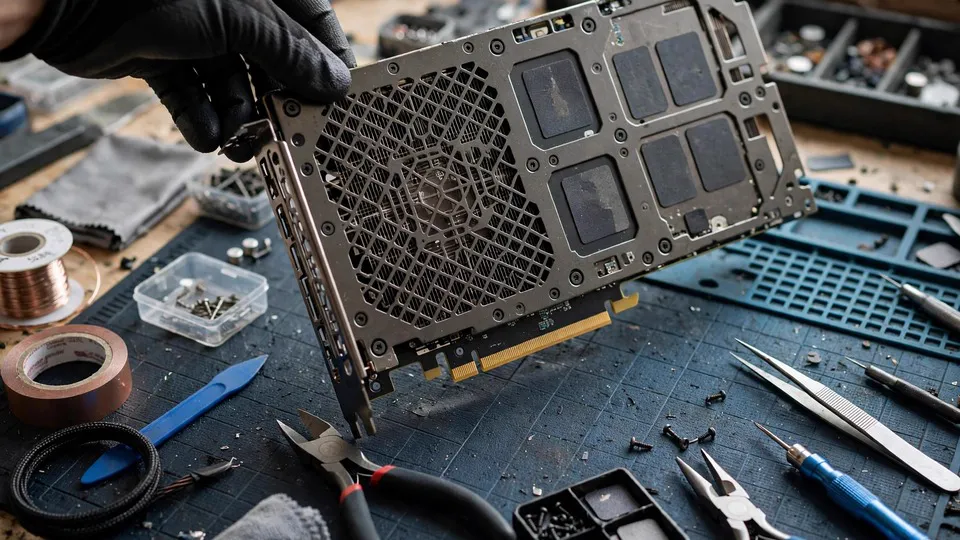
A graphics card board is conventionally described as having a front side and a back side. The front side usually carries the graphics processor, memory chips, power delivery components and the heatsink. The back side is the other face of the board, and depending on the design it may carry solder joints, some memory chips, capacitors and other components. The backplate is the plate that covers the back side, fixed to the board or to the cooling structure with screws. Its position determines its two basic functions: providing support from the back, and, in some designs, forming part of the heat path from the back of the board.
Structurally, the most direct function of the backplate is to increase the rigidity of the whole card. A graphics card is a relatively long board, fixed at one end to the case bracket, supported at the other region by the slot, and carrying a heatsink with considerable weight in the middle. Under that loading, the board has a tendency to bend. A backplate adds a layer of support from the back, reducing the amount of bending and distributing load more evenly between fixing points. This does not mean that a backplate can completely prevent bending. It means that, under the same loading, a card with a backplate will usually bend less than a card without one.
A second structural function is often overlooked: protection. Solder joints and components on the back side are relatively fragile, and during installation, removal, transport or cleaning they can easily be touched by fingers, tools or other hardware. A backplate covering the back side reduces that direct exposure. This protection is not absolute. A backplate has openings and edges, and the backplate itself must be handled during removal, so it must not be treated as an invulnerable shield. In everyday installation and inside a case, however, it does reduce the chance of direct contact with back-side components.
Metal Backplates and Plastic Backplates Compared
| Comparison item | Metal backplate | Plastic backplate |
|---|---|---|
| Structural rigidity | Generally higher, less likely to bend at the same thickness | Generally lower, relies on thickness or shaping to compensate |
| Heat conduction | Metal conducts heat more readily, more likely to form part of a heat path | Plastic conducts heat poorly, less likely to carry a heat-transfer role |
| Surface temperature feel | After conducting heat, the surface can feel clearly hot, which does not by itself mean a fault | Surface usually feels cooler, which does not mean back-side heat is lower |
| Weight | Usually heavier, adding to the total weight of the card | Usually lighter, adding less load to the slot |
| Removal and refitting care | Screw torque and order matter, and a deformed plate is hard to restore | Clip or screw posts can break and are hard to repair once damaged, with ageing brittleness to watch |
| Functional position | Structure plus heat transfer, depending on whether thermal pads contact back-side components | Mainly structure and protection, with a usually limited heat-transfer role |
This table must be read together with one reminder: material alone does not determine function. A metal backplate with no thermal pad contact to back-side components has a very limited heat-transfer role, and remains mainly structural and protective. Conversely, a plastic backplate with particular ventilation or contact arrangements cannot be judged as having no thermal role at all merely from its material. Judging backplate function requires looking at the actual contact arrangement between the plate and the board, not at the material label alone.
Coverage is another variable. Some backplates cover almost the whole back side of the board, some cover only part of it, and some have openings or slots in particular positions to allow ventilation or to avoid certain components. Large coverage does not necessarily mean better cooling, and many openings do not necessarily mean weak structure. A design must be judged as a whole: coverage, material, thermal pad positions, screw fixing points and front cooling structure together form the complete design. Taking any single item out of that whole and comparing it in isolation easily produces a distorted conclusion.
Backside Memory and Board Cooling: How the Backplate Takes Part in Heat Transfer
To understand the thermal role of the backplate, it is necessary to understand why the back side becomes hot in the first place. Memory chips and power delivery components generate heat while working. That heat passes from components into the board, then spreads through the board in all directions. If some memory chips are mounted on the back side of the board, their heat appears directly on the back. Even if all memory is on the front, the board itself will carry part of the heat to the back, and back-side temperature will rise accordingly. If back-side heat has no path to leave, it accumulates near the board and affects the working environment of surrounding components.
The backplate usually takes part in heat transfer through thermal pads. A thermal pad is a soft, flexible heat-transfer material that fills gaps, sandwiched between a back-side component and the backplate. Heat passes from the component into the pad, from the pad into the backplate, and the backplate spreads that heat over a larger area, from which case airflow can carry it away. Every link in that path matters. The pad must align with the component, its thickness must be correct, and its contact must be firm. The backplate must be able to spread the heat. Case airflow must be able to remove heat from the backplate surface. If any link breaks, the effectiveness of the whole path falls sharply.
Several details deserve attention. First, a thermal pad is not better merely because it is thicker, nor merely because it is thinner. A pad that is too thick can change the distance between the backplate and the board, affecting screw fixing and load distribution. A pad that is too thin may never touch the component, leaving a gap through which heat cannot pass. Second, pad position must align with heat-generating components. A pad displaced from its component transfers less heat, and may press on a component that should not be pressed. Third, after extended use, a pad's elasticity and heat-transfer ability can change, and after removal and refitting it may not return to its original contact state. These details return in the removal-risks section below.
A Hot Backplate: When It Is Normal Heat Spreading, and When It Is a Warning
A metal backplate that feels hot is, in many situations, entirely normal, and to some extent it is evidence that the backplate is doing its heat-transfer work. Heat passes from back-side components into the backplate, the backplate temperature rises, and that rise shows that heat has a path away from the components instead of accumulating entirely on the components themselves. Under higher load, such as extended graphics work or gaming, a rise in back-side temperature is expected. Judgement should follow the overall trend: as load rises, backplate temperature rises with it, and as load falls, backplate temperature falls with it. A trend that follows load is itself a normal signal.
Heat alone, however, is not an indicator that can be judged in isolation. Several situations should raise alertness. First, a backplate that stays at an unusually high temperature for a long time while the system is idle, with no clear relationship to load changes. Second, a backplate with a localised hot spot, where one area is clearly hotter than the rest, which may indicate an abnormal component or path, or a thermal pad contact problem. Third, backplate heat accompanied by other symptoms, such as display abnormalities, system instability, fans running at full speed for extended periods, or a clear change in card behaviour. Heat alone does not mean a fault, but heat combined with other symptoms must not be explained away by backplate heat alone.
A further principle applies to measurement: touch is not a thermometer. The feeling of heat is strongly affected by ambient temperature, contact time and personal perception. The same backplate can feel completely different in winter and in summer. If an objective reference is needed, temperature figures reported by system tools should lead, with backplate touch as only a supporting impression. System temperature figures have their own limits, since different sensor positions represent different components, but at least they provide a repeatable number that can be compared over time, while touch does not.
A plastic backplate that feels cool must not be taken as evidence that the back side is cool either. Plastic conducts heat poorly, so heat may not reach the surface clearly, while back-side component temperature can still be elevated. This is why material cannot be used directly to judge cooling state. Whether the backplate is metal or plastic, cooling state must be judged from system temperature data, load trends and other symptoms, not from surface feeling alone.
What a Backplate Cannot Do: Four Boundaries
First, a backplate is not a heatsink replacement. The front heatsink handles most of the heat from the graphics processor and the main heat-generating components, using a complete cooling system of fans, fins and heat pipes. Even where a backplate has a heat-transfer role, it handles only part of the back-side heat path, on a completely different scale from the front heatsink. Treating a backplate as a heatsink substitute, and assuming that a thicker backplate or a replacement backplate can solve a front cooling problem, misunderstands the cooling structure.
Second, a backplate cannot restore a card that has already failed. If a card cannot operate for other reasons, such as processor, memory, power delivery or detection-layer problems, the presence, absence or replacement of a backplate will not change that outcome. A backplate is an auxiliary structure, not a repair method. Linking backplate condition to repair capability only sends diagnosis in the wrong direction.
Third, a backplate cannot by itself solve the temperature problem of a whole card. Temperature is affected by many factors, including front cooling condition, case airflow, ambient temperature, load type, driver settings and component condition. A backplate is only one link. Improving backplate heat transfer may not change the overall temperature trend, especially when the main bottleneck lies in front cooling or case airflow. Temperature problems must be viewed as a whole-system question, not as a hope placed on a single plate.
Fourth, a backplate is not a warranty or quality guarantee. A card with a backplate is not necessarily more durable than a card without one, and a card without a backplate does not necessarily represent a design defect. A backplate is one design choice among others, and cards of different lengths, weights and market positions have different needs for one. When buying or evaluating a card, the backplate is only one observation point, and must not become the sole standard.
Removal and Refitting Risks: Screws, Thermal Pads, Warranty, Static and Bending
Removing a backplate looks simple, but it contains several risk points, each capable of causing damage that did not exist before. The first risk is screws. Backplate screws are often not all the same length or specification, and different positions may use different lengths. If screw positions are not recorded during removal, refitting can easily place a long screw into a shallow hole, or a short screw where a long screw is needed. A screw driven too deep can press against the board or other structures, while a short screw may fail to hold firmly, leaving the backplate unevenly loaded. Before removal, screws should be stored in a compartmented container by position, with a photograph or sketch recording which screw belongs to which position. That step looks tedious, but it is the most effective way to prevent refitting errors.
The second risk is screw order and torque. Backplate fixing usually requires a diagonal order, or an order working outward from the centre, tightening gradually rather than fully tightening one screw at once. Fully tightening one side at once tilts the backplate, loads the board unevenly, and in serious cases can bend the board slightly. Tightening must also avoid excessive force, because a stripped screw post or screw hole permanently reduces holding ability. The correct method is to bring all screws lightly into place first, confirm that the backplate is correctly positioned, then tighten gradually in order, a little at a time for each screw, cycling through several rounds until all are fixed.
The third risk is thermal pads. During removal, a pad may stick to the backplate, stick to a component, deform, tear, or shift position. Once deformed or torn, a pad refitted in place no longer has the same contact state, and its heat-transfer effectiveness changes with it. Some pads are no longer suitable for reuse after a single removal, yet that unsuitability is hard to judge from outside. More seriously, a shifted pad may press on a component that should not be pressed, or may leave a heat-generating component without heat-transfer contact. Before removal, the position, size and thickness of every pad should be recorded, and refitting should check each pad against that record, rather than relying on memory for placement.
The fourth risk is warranty. Many graphics card warranty terms treat disassembly as an act that affects warranty status, and a warranty sticker on the backplate or on a screw may be broken by removal. Before removing a backplate, warranty terms and warranty status must be confirmed, rather than assuming that removal has no effect, or assuming that warranty has already expired. Warranty status must be verified, not guessed.
The fifth risk is static and bending. Components on the back side of the board are sensitive to static discharge, and in a dry environment, static from the human body can damage components in ways that may not show immediately. Removal and refitting should take place in a suitable anti-static environment, not directly on carpet, and back-side solder joints and components should not be touched directly by hand. On bending, once the backplate is removed, the board loses a layer of support, and becomes easier to bend during handling or refitting. A card with its backplate removed should lie flat on a stable surface, and must not be held by one end in a way that bends it under its own weight.
| Removal step | Common error | Possible consequence | Correct practice |
|---|---|---|---|
| Before removing screws | No record of screw position and length | Wrong length refitted, uneven fixing or pressure on structure | Store screws by position in compartments, record each position |
| Loosening order | Loosening one side completely at once | Sudden load change on the backplate, uneven board loading | Loosen gradually in diagonal order, a little at a time |
| Handling thermal pads | Tearing, shifting or losing a pad | Changed heat-transfer contact, a component left without a heat path | Record position, size and thickness, handle gently, restore any shift |
| Refitting the backplate | Fully tightening one screw at once | Tilted backplate, increased board bending risk | Bring all screws lightly into place, then tighten gradually in order |
| After completion | No check of temperature and stability | A pad contact problem may only appear after some time | Observe temperature trends and operating stability after refitting |
To Remove or Not to Remove: A Decision Framework
Before removing a backplate, three questions should be asked. First, what is the purpose: cleaning, inspection, thermal pad replacement, handling bending, or pure curiosity about the inside. Purpose matters, because risk and necessity differ by purpose. Pure curiosity has a risk-to-reward ratio that does not justify removal. Second, have non-disassembly methods already excluded other possibilities. For a temperature question, have front cooling, case airflow, driver settings and load state already been checked. For a structural question, have slot and case fixing layers already been confirmed as not responsible. Removing a backplate before excluding other possibilities often ends with the discovery, after removal, that the problem was never on the back side. Third, what are the warranty status and restoration ability. After removal, can the original screw positions, original order and original thermal pad arrangement be restored. If any of those questions cannot be answered, stopping is wiser than opening.
Several situations are particularly unsuitable for self-removal. While warranty remains valid, disassembly may affect warranty status, and a formal channel should be used first. When pad condition is unknown and no suitable replacement arrangement exists, removal may make it impossible to restore the original contact state. When screws are already stripped or the backplate is already deformed, further removal and refitting will only worsen the fixing state. When screw positions and order are uncertain, refitting from memory carries very high risk. In these situations, leaving the card as it is and seeking inspection is safer than opening it.
Boundary Cases
The first boundary case is a backplate with no fault, but with elevated back-side temperature. That pattern may involve case airflow, front cooling condition or load type, rather than the backplate itself. Attributing every back-side temperature question to the backplate misses the real cause. Checking should start with overall temperature trends and case airflow, then move to the backplate layer.
The second boundary case is a backplate with slight bending or deformation, while the card operates normally. Slight deformation by itself does not necessarily require immediate handling, but it must not be ignored either. Deformation can affect screw fixing and thermal pad contact, and over time can change load distribution. The correct practice is to record the position and extent of the deformation, watch for later changes in temperature and stability, and avoid prising it straight. Prising it straight can itself cause further damage.
The third boundary case is adding a backplate to a card that has none. Third-party backplate products exist, but adding one involves size, screw hole positions, thermal pad contact, weight and warranty questions. A plate of similar size is not automatically suitable. Wrong hole positions, pads pressing the wrong positions, or added weight increasing slot load are all risks. Before adding one, hole positions, contact positions and warranty effects must all be confirmed. A plate judged suitable merely by similar size must not be fitted.
The fourth boundary case is the difference between cleaning the backplate surface and opening the backplate for cleaning. Wiping dust from the backplate surface carries relatively low risk. Opening the backplate to clean the back side carries much higher risk. During cleaning, it must be clear which of the two is being done, so that surface cleaning does not drift unnoticed into disassembly. Even surface cleaning requires care: liquid must not be allowed to flow between the backplate and the board, and the backplate must not be pressed hard enough to bend the board.
Common Misconceptions
Misconception one: a backplate is pure decoration, and removing it has no effect. In fact, a backplate provides structural support and protection, and in some designs it also carries a heat-transfer role. After removal, board rigidity falls, back-side components become more exposed, and any thermal pad path is interrupted. Removal may not cause immediate failure, but that does not mean it has no effect.
Misconception two: a hotter backplate means better cooling. A hot backplate only shows that heat has reached the backplate. It does not show that the whole cooling system performs well. Cooling performance must be judged from component temperature, system temperature data and stability, not from backplate surface feeling alone. An abnormally hot backplate combined with other symptoms is a warning sign, not a sign of success.
Misconception three: a cool backplate means there is no cooling problem. A plastic backplate surface can feel cool while back-side component temperature remains elevated, because plastic conducts heat poorly. Judgement must rest on system temperature data and load trends, not on surface feeling alone.
Misconception four: replacing a backplate can solve a temperature problem. Temperature problems involve front cooling, case airflow, load and component condition, with the backplate as only one link. Before replacing a backplate, it must be confirmed that the bottleneck truly lies in the back-side heat-transfer path. Otherwise replacement will not produce the expected effect.
Misconception five: removing a backplate is simple, and refitting restores everything. Removal and refitting involve screw positions, order, torque, thermal pad restoration, warranty and static protection, and an error in any one of them can create a new problem. A refitted backplate that looks complete does not guarantee that internal contact and loading have returned to their original state.
Misconception six: having a backplate means good quality, and lacking one means corner-cutting. A backplate is one design choice among others, and cards of different lengths, weights and positions have different needs for one. A card must be judged by its whole design, not by the presence or absence of a backplate as the sole standard.
What to Record Before Seeking Inspection
First, an external description of the backplate, including whether it is metal or plastic, roughly how much of the back side it covers, and whether it has openings or deformation. Second, how backplate temperature was observed and how it trends, including under what load it felt hot, whether there is a clear difference between idle and load, and whether there is a localised hot spot. Third, temperature figures reported by system tools together with load state and fan behaviour. Fourth, case airflow and placement, including case position, fan arrangement, and any object blocking airflow around the case. Fifth, whether the backplate has been removed before, whether any screw is stripped, and whether any thermal pad has shifted or been damaged, described as fact. Sixth, whether the card shows any other symptom, such as display abnormality, stability problems, or detection problems, rather than backplate heat alone.
Write these notes down as text, so that inspection can consider the backplate layer together with the whole cooling system, instead of estimating again from surface feeling alone.
Frequently Asked Questions
Q: What is a graphics card backplate actually for?
A: Mainly three things: increasing board rigidity and reducing bending, protecting back-side components from direct contact, and, in designs where thermal pads contact back-side components, forming part of the back-side heat-transfer path. Which of these matters most depends on material, coverage and thermal pad arrangement, and cannot be generalised without that context.
Q: Is a metal backplate always better than a plastic backplate?
A: Not necessarily. Metal generally offers higher rigidity and heat conduction, but also greater weight. Plastic is generally lighter, but offers lower rigidity and a more limited heat-transfer role. Function must be judged by the whole design, including thermal pad contact and screw fixing, not by material alone.
Q: The backplate feels very hot. Does that mean the card is overheating?
A: Not necessarily. Under high load, a hot backplate can be a normal heat-transfer phenomenon. Judgement must consider load trends, system temperature data and whether other symptoms are present. Long-term abnormally high temperature at idle, a localised hot spot, or heat combined with other symptoms are the patterns that deserve attention.
Q: The backplate feels cool. Does that mean cooling is fine?
A: No, especially for a plastic backplate. Plastic conducts heat poorly, so a cool surface does not prove that back-side component temperature is normal. Cooling state must be judged from system temperature data and load trends, not from backplate surface feeling.
Q: After removing the backplate, can the card still be used normally?
A: It may still operate in the short term, but structural support falls, back-side components become more exposed, and a card with a thermal pad design loses its back-side heat-transfer path. Removal does not mean immediate damage, but it must not be treated as a harmless long-term state.
Q: What is the greatest risk in removing a backplate to replace thermal pads?
A: The greatest risk is not the removal itself, but failing to restore the original state on refitting. Wrong screw positions, wrong tightening order, shifted or torn thermal pads, and changed warranty status can each create a new problem. Before removal, screw positions, order and thermal pad arrangements must be recorded, and warranty terms must be confirmed.
Q: Can a backplate be added to a card that has none?
A: It is not advisable to fit one merely because its size is similar. Adding one involves screw hole positions, thermal pad contact positions, weight and warranty questions, and wrong hole positions or pads pressing the wrong positions can create new problems. Unless all of those factors are confirmed, leaving the card as it is remains safer.
Q: Can a backplate replace a heatsink, or repair a dead card?
A: No. A backplate handles only part of the back-side heat path, on a completely different scale from a front heatsink, and a card that has failed for processor, memory, power delivery or detection reasons will not be restored by changing or removing a backplate. A backplate is an auxiliary structure, not a repair method.
Conclusion: A Backplate Is an Auxiliary, Not the Protagonist
The value of a backplate lies in the auxiliary work it quietly performs: supporting the board from the back, protecting back-side components, and, in thermal pad designs, helping to spread back-side heat. It is not a heatsink, not a repair tool, and not the sole standard by which a card should be judged. Understanding a backplate means understanding its position and its limits: within its proper range, it matters a great deal, and beyond that range, expectations must be scaled back.
If questions remain about backplate temperature, deformation or removal, bring the observations and figures described above when seeking inspection. They are far more useful than a general statement that the backplate feels hot. HK GPU Fix is located at Dali Plaza, Room 1209, Shek Mun, with telephone 2186 8010 and WhatsApp 6558 6806.