GPU Heatsink Fins Bent or Deformed? How to Tell Blocked Airflow, Local Hotspots & Fan Scraping Apart
Key Takeaways
Bent heatsink fins narrow or close the air channels between them, so less air reaches the affected area and heat builds up locally. The same bend can also let a fan blade scrape the fin edge. This guide explains how to inspect the fins, separate blocked airflow, local hotspots and fan scraping, and decide when to leave a bend alone.
How a Graphics Card Heatsink Moves Heat
A graphics card cooler is usually made up of a base plate or vapour chamber, heat pipes, a stack of thin aluminium fins, and one or more fans. Heat from the GPU core, the memory chips, and the power delivery components travels first into the base of the heatsink, then spreads through the heat pipes or vapour chamber into the fin stack, and finally leaves the card when the fans push air through the narrow channels between the fins.
The fins themselves are very thin sheets of aluminium, generally a fraction of a millimetre thick, arranged in parallel rows with narrow air gaps between them. Their job is to spread the available surface area over a much larger region, so that moving air can carry away more heat. The exact thickness and spacing differ between cooler designs, and no single figure applies to every card.
One distinction matters throughout this guide: the fins do not create cold air. They only provide surface area and air channels. The fans provide the airflow. When the channels are open and evenly spaced, air is distributed fairly evenly across the whole fin stack. When part of the stack is bent, the air distribution changes, and the affected region receives less airflow than the rest.
Why a Bend Changes Cooling
When a fin bends, the channel beside it narrows, and in a severe bend it can close completely where several fins lean together. The region behind that closed channel receives less air, so the heat that reaches those fins is carried away more slowly and the local temperature rises. The effect is not a simple count of bent fins. Where the bend sits matters far more than how many fins are involved.
A bend directly above the GPU core, or above the area where the heat pipes concentrate, blocks airflow where the heat load is highest, so its effect is larger. A bend at the far edge of the fin stack, away from the main heat sources, may have little measurable effect at all. That is why a guide cannot convert a number of bent fins into a temperature change: position, the degree of narrowing, and whether the fan is also affected all change the result.
A second, slower effect follows from the first. A deformed channel traps dust more easily than a straight one. Dust that settles in a bent passage is harder to blow out, and once it clumps together it narrows the channel further. The result is a cycle in which the bend encourages dust build-up and the dust build-up makes the blocked airflow worse. Dust removal itself is covered in a separate cleaning guide; here it matters only as the reason a bent fin should not be judged on the day the bend happened, but watched over time to see whether the situation is getting worse.
A third effect is mechanical rather than thermal. A bent fin edge can stick out into the path of a fan blade. When the blade turns, its tip strikes the protruding edge once per revolution, producing a regular scraping or tapping sound and, over time, wearing the blade edge. This is a physical interference problem, not a cooling problem, although it shares the same cause. It needs to be treated as an urgent problem, because continued running wears the blade and increases the load on the fan motor.
What Bends Heatsink Fins
Fins bend because they are thin, exposed, and easy to press out of shape. Normal use, normal air pressure, and normal heating and cooling cycles do not bend them. The causes are almost always physical force.
The most common cause is an impact or a drop. A card that has been dropped, knocked, or squeezed during transport takes the force on its most exposed parts first, and the fin edges are usually the first thing to meet that force. Even a light knock can bend several fins at the edge of the stack.
Handling during installation and removal is the next cause. Fingers or tools pressing on the fin edge while the card is being fitted or removed, the fin stack catching on the case frame as the card is slid into place, or the card shifting during a move and striking another component inside the case can all bend fins. The risk is highest when the card is handled by the cooler rather than by its edges or bracket.
Cleaning with the wrong tools is another cause. Scraping between the fins with a hard object such as a screwdriver, a metal rod, or a stiff brush, or pressing the nozzle of a vacuum cleaner hard against the fin stack, can bend fins that were straight before cleaning began. The correct cleaning method uses short bursts of air with the fan blades held still, and no hard object pushed between the fins.
A worn fan bearing can turn a small bend into a noise problem. As a bearing wears, the blade assembly can wobble more while it turns, so the blade tips sweep a wider circle. A fin that was only slightly bent, and previously clear of the blades, can start to be struck once the wobble grows. In that situation two separate problems exist at once — the bent fin and the worn bearing — and they need to be judged separately, because fixing only one of them may not silence the noise.
Thermal expansion and contraction do not bend fins. Expansion and contraction can stress solder joints and circuit board layers, which is a different class of fault with its own symptoms. It should not be listed as a cause of fin deformation.
Symptoms: How a Bent Fin Shows Itself
Temperature symptoms
Under the same workload, the core temperature sits clearly higher than the same card showed before, under the same conditions. The comparison must be against the card's own previous baseline — the same game, the same benchmark scene, the same case, and the same room conditions — not against any published figure for what a card of that model "should" run at. No universal temperature threshold can be used, because different cards, cases, and environments differ.
The size of the rise depends on where the bend is and how much of the airflow it blocks. A few bent fins at the edge may produce no noticeable change. A wide area of closed channels above the core produces a larger and more obvious rise. The hotspot temperature, where the monitoring software reports one, is a useful second reading: a bend above the core tends to raise both the core temperature and the hotspot temperature together, while an edge bend may leave both almost unchanged. A large gap between hotspot and core temperature is a different diagnostic topic, related to contact between the heatsink and the chip, and should not be confused with an airflow problem. The distinction is one of mechanism: a bent fin is an airflow problem, while poor contact is a heat-transfer problem at the base of the cooler.
When temperatures rise, the fans usually spin faster and louder to compensate. That louder fan is a result of the reduced airflow, not evidence that the fan itself has failed. Treating fan noise as proof of a fan fault is one of the common errors this guide warns against.
Sound symptoms
The characteristic sound of a blade striking a bent fin is a regular scraping or tapping noise that changes with fan speed. As the fan spins faster, the strikes come more frequently; as it slows, they space out. That regularity is the clue that separates it from bearing noise, which is usually a continuous humming or gritty sound that does not follow the rhythm of individual blade passes.
The sound may appear only within a certain speed range. At low speed the blade wobble is small and the tip may clear the bent edge; once the speed rises past a certain point, the tip starts to strike. A scraping sound that appears suddenly, where none existed before, should prompt a check for recent force — a drop, a move, or a cleaning session — rather than an assumption that the fan has worn out on its own.
Visual symptoms
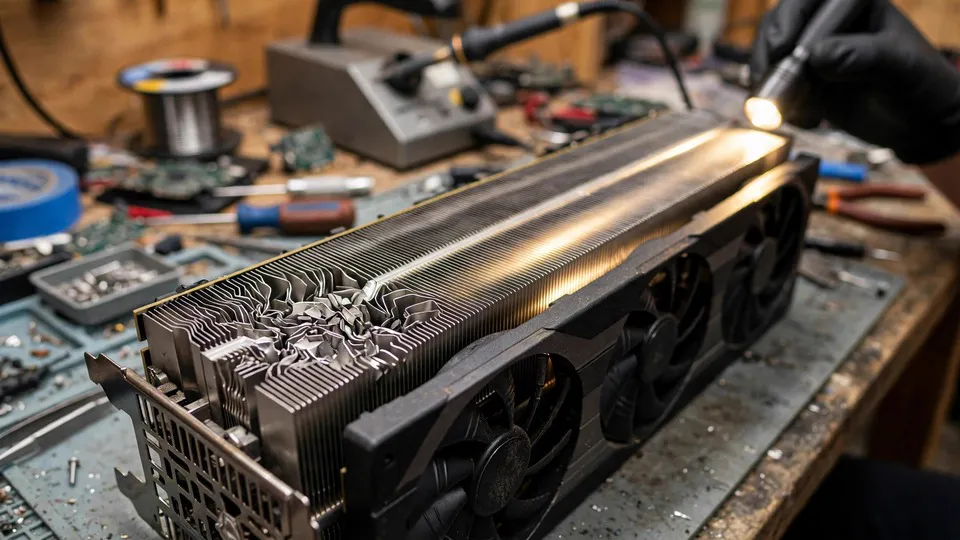
Looked at from the side or the end of the fin stack, with a torch shining along the fins, a healthy stack shows a series of straight, parallel lines. Bent fins show as lines that lean to one side, a group of fins pressed together, or a section where the stack has collapsed sideways. In a severe case the channels close up and no light passes through that section. A slight bend may only become visible when the two sides of the stack are compared with each other.
Scuff marks or wear on the edge of a fan blade are indirect evidence that the blade has already been striking a fin. The blade edge and the fin edge should be inspected together, since either one alone can mislead.
Surface discolouration from oxidation, and dust coating the fins, are not the same as bending. A dusty fin can look uneven in poor light, so the inspection should be done with a clear light and a direct view along the channels, not from a single glance at the top of the cooler.
Diagnosis: Separating Blocked Airflow, Hotspots and Fan Scraping
Work in this order: look, then test the fan by hand, then compare temperatures, then rule out the other cooling problems. Every hands-on step should be done with the power disconnected.
Step 1: Visual inspection, without removing the card
Shut the computer down, unplug the power cable, and remove the side panel. Shine a torch along the fin stack from both ends and look for fins that lean, collapse, or press together. Note where the bend is: at the edge or above the core, and under which fan. At the same time, look at the edges of the fan blades for scuff marks, which would show that contact has already happened.
Record the position before moving on. The position determines how much the bend is likely to matter, and it is the detail a repair assessment will need if the card is later brought in.
Step 2: Hand test for fan interference, with the power off
Flick each fan gently with a finger and turn it slowly through a full revolution. Feel for any point where the blade catches, scrapes, or resists. A scraping feeling at one point in the turn means the blade and a fin are interfering, and that problem should be dealt with first, because continued running will wear the blade further and can leave fragments inside the cooler.
If the fan itself feels stiff, or its shaft wobbles noticeably, that points to a fan problem rather than a fin problem. The two can exist together, so a stiff fan does not prove the fins are straight, and bent fins do not prove the fan is worn. Judge each one on its own evidence.
Step 3: Temperature comparison against the card's own baseline
Open GPU-Z or HWiNFO and record the core temperature and hotspot temperature under one fixed workload — the same game and the same scene, or the same benchmark run — for several minutes. Compare those readings with the readings the same card produced under the same workload before the bend appeared. A bend above the core that closes the airflow tends to raise both readings together. An edge bend may change neither.
A single reading taken at one moment is not enough, because temperatures move with load. The comparison only means something when the workload, the case, and the monitoring conditions match.
Step 4: Rule out the other cooling problems
| Other problem | How it looks | How to tell it apart from bent fins |
|---|---|---|
| Dust build-up | Dust spread evenly across the whole fin stack, temperatures rising gradually | Dust is uniform, a bend is local; if cleaning restores the baseline, dust was the main cause; if temperatures stay high after cleaning and a bend is visible, the bend is the main cause |
| Aged thermal paste or thermal pads | Temperatures rise while the fins look straight and the fans behave normally | The fins are undamaged, so the fault sits at the interface materials between chip and heatsink |
| Fan fault | A fan does not spin, spins at the wrong speed, or feels stiff by hand | A bent fin does not stop a fan, except in the extreme case where a blade is jammed against a fin and cannot turn at all |
| Case airflow | Temperatures are high because the case itself is starved of intake air | Open the side panel and repeat the same workload; a clear improvement points to the case, while no improvement plus a visible bend points to the fins |
A card that drops clocks under load, or that shows a black screen or a restart, has moved beyond what a bent fin alone can explain. Those symptoms need a wider diagnosis covering power delivery and overall stability, and should not be blamed on the fins by default.
What to Do: Leave It, Watch It, or Seek Inspection
Slight bend, normal temperatures, no scraping sound
A few fins bent slightly at the edge, with temperatures unchanged from the card's own baseline and no scraping sound, can be left alone. Keep using the card normally and check the fins again from time to time to see whether the bend is spreading or dust is collecting in the deformed channels.
Do not straighten fins for the sake of appearance. The fins are thin, and the act of bending one back can snap it or bend its neighbours, leaving the stack worse than before.
Bend present, no scraping, temperatures slightly above baseline
Clean the dust first, using the safe method: hold the fan blades still, use short bursts of air, and keep hard objects away from the fins. Then repeat the same workload and compare the temperatures again. If cleaning restores the baseline, dust was adding to the problem. If temperatures remain above baseline but the card is not dropping clocks, the card can continue in use with shorter inspection intervals, watching for further deterioration.
Do not use a metal tool to lever bent fins back into place. A metal tool can easily scratch neighbouring fins, snap a fin, or damage the surface of a heat pipe. This guide does not give instructions for bending fins back with tools, because the risk of making the damage worse is high and the benefit is uncertain.
Already scraping, or temperatures clearly getting worse
A blade striking a fin should not be left to run under heavy load for long. The blade wears with every strike, and fragments can fall into other parts of the cooler. The card should be brought in for assessment, so that a repairer can judge whether the fin can be tidied locally or whether the whole cooler needs attention.
If temperatures have deteriorated to the point where the card drops clocks during games, or shows intermittent black screens or restarts, the problem has moved beyond a simple fin bend and needs a full inspection. The same applies when the cooler has other damage at the same time, such as a flattened heat pipe, a deformed base, or a large collapsed section of fins. In that case the damage should be described as cooler structure damage, not as a single bent fin.
When repair is not the sensible option
When a large area of fins has collapsed, or a whole row of fins has separated from the heat pipes, local tidying is no longer enough and the whole cooler would need replacement, or the value of repairing the card as a whole would need to be weighed. No repair price can be quoted in advance here. The published three-tier repair service fee range on this site is HK$400–2,800, with the actual quote given after inspection.
Common Mistakes
- "A bent fin means the card is finished." Wrong. A slight bend can have very little effect on cooling. The test is the temperature baseline and whether anything is scraping, not how perfect the fins look.
- "Lever it straight again with a screwdriver." Wrong. The fins are thin and brittle. A hard tool can snap a fin or bend more fins, and a fin that has been bent back is weaker than before and bends again more easily.
- "Count the bent fins to work out the temperature rise." Wrong. The effect depends on where the bend is, how much of the channel is closed, and whether the fan is scraping — not on a count of fins.
- "A noisy fan is always a faulty fan." Wrong. A bent fin reduces airflow, so the fan spins faster to compensate and gets louder; a scraping sound can be the blade hitting a fin rather than a bearing problem. Replacing the fan does not fix a bent fin.
- "A bent fin will directly damage the memory chips." Wrong. A bent fin only makes cooling worse and temperatures higher. Higher temperature on its own is not the same as memory damage, and memory faults have their own diagnostic signs.
- "A vacuum cleaner nozzle pressed against the fins is the best way to clean them." Wrong. Pressing the nozzle against the fins can bend them, and the suction can spin a fan fast enough to damage its bearing. Hold the blades still and use short bursts of air instead.
Frequently Asked Questions
How can I tell whether my fins are bent or just dusty?
Shine a torch along the fin stack from the end. Dust coats the fins fairly evenly across the whole stack, while a bend is a local change in shape: fins leaning to one side, pressed together, or with a channel closed up. If cleaning restores the temperature baseline, dust was the main cause. If the temperature stays high after cleaning and a bend is visible, the bend is the main cause.
My fan is louder than before. Does that mean the fan is failing?
Not necessarily. When airflow is reduced, the fan spins faster to hold temperatures down, which makes it louder. Listen for the type of sound: a regular scraping or tapping that speeds up with the fan points to a blade striking a bent fin, while a continuous humming or gritty sound points more towards a bearing. A fan that feels stiff or wobbles when turned by hand, with the power off, is a separate fan problem.
Can I bend the fins back straight myself?
It is not recommended. The fins are thin and snap easily, and bending one back often bends its neighbours or weakens the fin so it bends again. A metal tool makes the risk worse, since it can scratch neighbouring fins or a heat pipe. If the bend is causing scraping or a clear temperature rise, the card should be assessed rather than straightened at home.
How much does a bent fin affect temperatures?
That depends on position, not on a count of fins. A bend above the GPU core, where the heat load is highest, has a larger effect than a bend at the edge of the stack. The only reliable measure is the card's own baseline: compare core and hotspot temperatures under the same workload before and after the bend appeared, and judge by the change.
The scraping sound only appears at certain fan speeds. Is that normal for this problem?
Yes, that pattern fits fan scraping. At low speed the blade tip may clear the bent edge, and only once the speed rises does it start to strike. That speed-related pattern is itself useful evidence, and it is different from bearing noise, which is usually present across a wider speed range.
Should I keep gaming if the fan blade is scraping a fin?
Heavy use should be avoided until the card is assessed. Every strike wears the blade edge further, and fragments can fall into the cooler. Light use with temperatures monitored is less risky, but the scraping should not be ignored for weeks while the card is run hard.
When is a bent fin not worth repairing?
When a large area of the fin stack has collapsed, or fins have separated from the heat pipes, local tidying cannot restore the cooler. At that point the whole cooler would need replacement, or the value of repairing the card as a whole needs to be weighed. The published three-tier repair service fee range on this site is HK$400–2,800, with the actual quote given after inspection.
Getting Help
A bent fin is a physical problem that can be judged by looking at the cooler, listening to the fan, and comparing temperatures against the card's own baseline. When the bend is slight and nothing has changed, leaving it alone is the sensible choice. When the blade is scraping, or temperatures keep rising, an inspection is the sensible next step rather than forcing the fins back into shape at home. HK GPU Fix is at Room 1209, Dali Plaza, Shek Mun. For enquiries, call 2186 8010 or WhatsApp 6558 6806. There is no on-site service, so the card should be brought to the shop for inspection.